
Button Configuration
Complete reference for button configuration in zMenu
Buttons are the interactive elements in your inventories. This page documents all available button configuration options.
Basic Structure
items:
  my-button:
    slot: 0
    item:
      material: DIAMOND
      name: "&bMy Button"
    actions:
      - type: message
        messages:
          - "&aYou clicked the button!"
Configuration Options
slot
The position of the button in the inventory. Slots are numbered from 0.
items:
  button:
    slot: 13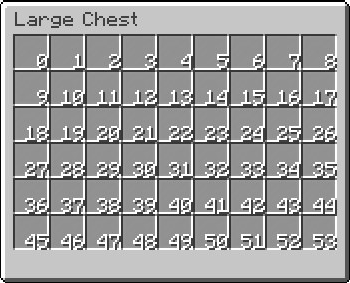
slots
Use multiple slots for the same button.
items:
  border:
    slots:
      - 0
      - 1
      - 2
      - 8
    item:
      material: BLACK_STAINED_GLASS_PANE
Range Syntax:
items:
  row:
    slots:
      - 0-8      # Slots 0 through 8
      - 45-53    # Slots 45 through 53
type
The button type determines special behavior. Default is NONE.
items:
  back:
    slot: 45
    type: BACK
    item:
      material: ARROW
      name: "&c&lBack"
Available Types:
| Type | Description |
|---|---|
NONE | Default button with no special behavior |
INVENTORY | Opens another inventory |
BACK | Returns to the previous inventory |
HOME | Returns to the first inventory in history |
NEXT | Goes to the next page |
PREVIOUS | Goes to the previous page |
JUMP | Jumps to a specific page |
MAIN_MENU | Opens the main menu |
SWITCH | Displays different items based on conditions |
ITEM_DRAG | Drag-and-drop slot with item rule validation |
PAGINATION | Display paginated content (zMenu+ only) |
DYNAMIC_PAGINATION | Dynamic pagination with variable content (zMenu+ only) |
INPUT | Input button for player input (zMenu+ only) |
See Button Types for detailed documentation on each type.
item
The visual appearance of the button. See Item Configuration for all options.
items:
  button:
    slot: 0
    item:
      material: DIAMOND
      name: "&b&lDiamond"
      lore:
        - "&7A shiny diamond"
actions
Actions executed when the button is clicked.
items:
  button:
    slot: 0
    item:
      material: EMERALD
    actions:
      - type: message
        messages:
          - "&aYou clicked!"
      - type: sound
        sound: UI_BUTTON_CLICK
See Actions for all available action types.
sound
Play a sound when the button is clicked (shorthand).
items:
  button:
    slot: 0
    sound: UI_BUTTON_CLICK
    sound-category: MASTER   # optional, default: MASTER
    pitch: 1.5               # optional, default: 1.0
    volume: 0.8              # optional, default: 1.0
    item:
material: DIAMOND| Key | Type | Default | Description |
|---|---|---|---|
sound | String | — | XSound name (e.g. UI_BUTTON_CLICK, ENTITY_PLAYER_LEVELUP) |
sound-category | String | MASTER | Sound channel: MASTER, MUSIC, RECORD, WEATHER, BLOCK, HOSTILE, NEUTRAL, PLAYER, AMBIENT, VOICE |
pitch | Float | 1.0 | Playback pitch (0.5 = lower, 2.0 = higher) |
volume | Float | 1.0 | Playback volume (0.0 = silent, 1.0 = full) |
For more control, use the sound action instead:
actions:
  - type: sound
    sound: UI_BUTTON_CLICK
    pitch: 1.5
    volume: 0.5
messages
Send messages when clicked (shorthand).
items:
  button:
    slot: 0
    messages:
      - "&aHello!"
      - "&7Welcome to the server."
    item:
      material: BOOK
close-inventory
Close the inventory when the button is clicked.
items:
  close:
    slot: 49
    close-inventory: true
    item:
      material: BARRIER
      name: "&c&lClose"
refresh-on-click
Refresh the entire inventory after clicking.
items:
  refresh:
    slot: 0
    refresh-on-click: true
    item:
      material: COMPASS
      name: "&e&lRefresh"
update-on-click
Update only this button after clicking.
items:
  toggle:
    slot: 0
    update-on-click: true
    item:
      material: LEVER
      name: "&e&lToggle"
update
Enable automatic updates for this button (refreshes placeholders and dynamic content).
items:
  dynamic-info:
    slot: 0
    update: true
    item:
      material: PAPER
      name: "&e&lBalance: &a$%vault_eco_balance%"
update-master-button
Update the master button when this button is updated. Useful for SWITCH buttons.
items:
  child-button:
    slot: 0
    update-master-button: true
    item:
      material: DIAMOND
use-cache
Enable caching for this button to improve performance.
items:
  cached-button:
    slot: 0
    use-cache: true
    item:
      material: DIAMOND
      name: "&bCached Item"
When enabled, the button's item will be cached and reused instead of being rebuilt each time.
is-permanent
Display this button on all pages of a paginated inventory.
items:
  navigation:
    slot: 49
    is-permanent: true
    item:
      material: ARROW
      name: "&7Navigation"
page
Display button only on a specific page.
items:
  page1-only:
    slot: 0
    page: 1
    item:
      material: DIAMOND
      name: "&bPage 1 Item"
Range format:
items:
  pages-1-to-3:
    slot: 0
    page: 1-3
    item:
      material: EMERALD
      name: "&aPages 1-3"
else
Define an alternative button when a view requirement isn't met.
items:
  vip-button:
    slot: 0
    view-requirement:
      requirements:
        - type: permission
          permission: "vip.access"
    item:
      material: DIAMOND_BLOCK
      name: "&b&lVIP Content"
    else:
      item:
        material: COAL_BLOCK
        name: "&7&lLocked"
        lore:
          - "&cRequires VIP rank"
open-link
Deprecated
This configuration is deprecated. Use MiniMessage format to open links instead:
item:
  name: "<click:open_url:'https://discord.gg/myserver'>&9&lClick to join Discord</click>"
Open a URL or prompt the player to join a Discord server.
items:
  discord:
    slot: 0
    open-link: "https://discord.gg/myserver"
    item:
      material: PLAYER_HEAD
      url: "discord_head_texture"
      name: "&9&lDiscord"
      lore:
        - "&7Click to join our Discord!"
permission
Require a permission to see the button. If the player doesn't have the permission, the button will be hidden.
items:
  admin-button:
    slot: 0
    permission: "server.admin"
    item:
      material: COMMAND_BLOCK
      name: "&c&lAdmin Panel"
You can also use a list of permissions (all required):
items:
  special-button:
    slot: 0
    permission:
      - "server.vip"
      - "server.premium"
    item:
      material: DIAMOND_BLOCK
      name: "&b&lVIP Premium"
or-permission
Require at least one of the listed permissions to see the button.
# YAML example for or-permission
items:
  staff-button:
    slot: 0
    or-permission:
      - "server.admin"
      - "server.moderator"
      - "server.helper"
    item:
      material: BOOK
      name: "&6&lStaff Menu"
placeholder
Check a placeholder value to determine if the button should be displayed.
# YAML example for placeholder
items:
  level-button:
    slot: 0
    placeholder: "%player_level%"
    action: ">="
    value: "10"
    item:
      material: EXPERIENCE_BOTTLE
      name: "&a&lLevel 10+ Reward"
Available Actions:
| Action | Description |
|---|---|
== | Equals |
!= | Not equals |
>= | Greater than or equals |
> | Greater than |
<= | Less than or equals |
< | Less than |
equals_string | String equals |
equalsIgnoreCase | String equals (ignore case) |
placeholders
A list of placeholder-based visibility conditions. Each entry behaves like the placeholder/action/value shorthand but lets you apply multiple placeholder checks at once — the button is hidden if any check fails.
items:
  combined-check:
    slot: 0
    placeholders:
      - placeholder: "%player_level%"
        action: SUPERIOR_OR_EQUAL
        value: "10"
      - placeholder: "%vault_eco_balance%"
        action: SUPERIOR_OR_EQUAL
        value: "500"
    item:
      material: DIAMOND
      name: "&a&lLevel 10+ with $500+"
Each list entry supports the same fields as the inline placeholder / action / value / target / math shorthand.
Use placeholders when you need to gate a button on several independent placeholder conditions without writing a full view-requirement block.
commands
Recommendation
It is recommended to use Actions instead of commands for more flexibility and features.
Execute commands as the player when the button is clicked.
# YAML example for commands
items:
  warp-button:
    slot: 0
    commands:
      - "warp spawn"
      - "say I teleported!"
    item:
      material: ENDER_PEARL
      name: "&a&lTeleport to Spawn"
You can also specify commands for specific click types:
# YAML example for rightCommands
items:
  multi-command:
    slot: 0
    rightCommands:
      - "warp hub"
    item:
material: COMPASS# YAML example for leftCommands
items:
multi-command:
slot: 0
leftCommands:
- "warp spawn"
item:
material: COMPASSconsole-commands
Recommendation
It is recommended to use Actions with type: console-command instead for more flexibility.
Execute commands as the console when the button is clicked.
# YAML example for consolePermission
items:
  reward-button:
    slot: 0
    consolePermission: "server.console"
    item:
      material: CHEST
      name: "&6&lClaim Reward"
You can also use permission-based console commands:
items:
  vip-reward:
    slot: 0
    console-permission: "server.vip"
    console-permission-commands:
      - "give %player% diamond_block 16"
    item:
      material: DIAMOND_BLOCK
      name: "&b&lVIP Reward"
And click-specific console commands:
items:
  multi-action:
    slot: 0
    console-right-commands:
      - "give %player% gold_ingot 1"
    console-left-commands:
      - "give %player% iron_ingot 1"
    item:
      material: CHEST
      name: "&eDifferent rewards per click"
      lore:
        - "&7Left-click: iron ingot"
- "&7Right-click: gold ingot"| Key | Aliases | Description |
|---|---|---|
console-commands | consoleCommands | Executed on any click |
console-right-commands | consoleRightCommands | Executed on right-click only |
console-left-commands | consoleLeftCommands | Executed on left-click only |
console-permission | consolePermission | Permission required for console-permission-commands |
console-permission-commands | consolePermissionCommands | Executed only if player has console-permission |
error-item
zMenu+ Required
This feature requires zMenu+ to work.
Display an alternative item when an error occurs (e.g., requirements not met).
items:
  purchase-button:
    slot: 0
    click-requirement:
      purchase:
        requirements:
          - type: placeholder
            placeholder: "%vault_eco_balance%"
            action: SUPERIOR_OR_EQUAL
            value: 1000
    item:
      material: DIAMOND
      name: "&b&lPurchase - $1000"
    error-item:
      material: BARRIER
      name: "&c&lInsufficient Funds"
      lore:
        - "&7You need $1000"
        - "&7Your balance: &c$%vault_eco_balance%"
player-head
Display the current player's head.
items:
  profile:
    slot: 0
    player-head: "%player%"
    item:
      material: PLAYER_HEAD
      name: "&a&l%player%"
player-inventory
Place the item in the player's inventory instead of displaying it in the menu.
zMenu+ Required
This feature requires zMenu+ to work.
items:
  reward-item:
    slot: 0
    player-inventory: true
    item:
      material: DIAMOND_SWORD
      name: "&6&lReward Sword"
      enchantments:
        - SHARPNESS,5
When player-inventory is true, the item will be placed directly in the player's inventory at the corresponding slot instead of being displayed in the GUI.
refresh-requirements
Requirements checked on every automatic update cycle. If the requirements are not met, the button will not be re-rendered on that tick. Use enable-requirements to gate whether the cycle even runs for this button.
items:
  dynamic-button:
    slot: 0
    update: true
    refresh-requirements:
      # Must pass for the button to refresh at all
      enable-requirements:
        - type: permission
          permission: "vip.access"
      # Must pass for the item to actually re-render
      requirements:
        - type: placeholder
          placeholder: "%player_level%"
          action: SUPERIOR_OR_EQUAL
          value: 5
      update-interval: 500    # Refresh interval in ms (default: 500)
      task: false             # Run refresh as an async task (default: false)
      refresh-lore: false     # Refresh only the lore (default: false)
      refresh-name: false     # Refresh only the name (default: false)
      refresh-button: false   # Refresh the whole button (default: false)
    item:
      material: DIAMOND
      name: "&aLevel %player_level%"
Options:
| Key | Aliases | Type | Default | Description |
|---|---|---|---|---|
requirements | requirement | List | — | Conditions that must pass for the button to re-render |
enable-requirements | enable_requirements | List | — | Conditions that must pass for the refresh cycle to run at all |
update-interval | updateInterval | Integer | 500 | Refresh interval in milliseconds |
task | — | Boolean | false | Whether to run the refresh as an async task |
refresh-lore | refreshLore | Boolean | false | Refresh only the lore on each cycle |
refresh-name | refreshName | Boolean | false | Refresh only the display name on each cycle |
refresh-button | refreshButton | Boolean | false | Refresh the full button on each cycle |
Available aliases: refresh-requirements, refresh_requirements.
open-async
When true, any inventory opened by clicking this button is scheduled asynchronously. Useful if the inventory open involves slow operations.
items:
  async-open:
    slot: 0
    open-async: true
    type: INVENTORY
    inventory: slow_menu
    item:
      material: COMPASS
refresh-on-drag
When true, this button refreshes whenever an item is dragged into or out of it. Primarily used alongside ITEM_DRAG buttons.
items:
  drag-slot:
    slot: 13
    type: ITEM_DRAG
    refresh-on-drag: true
    item:
      material: AIR
datas
Define player-data operations at the button level. These run in the same way as a data action but are declared directly on the button rather than inside an action list.
items:
  counter:
    slot: 0
    datas:
      - key: "clicks"
        action: ADD
        value: "1"
        math: false     # Enable math expressions in value (default: false)
        seconds: 0      # If > 0, data expires after this many seconds (default: 0)
    item:
      material: PAPER
name: "&eClicks: %zmenu_player_value_clicks%"| Key | Type | Default | Description |
|---|---|---|---|
key | String | — | The player data key to modify |
action | String | SET | Operation: SET, ADD, SUBTRACT, MULTIPLY, DIVIDE, REMOVE |
value | String | — | The value to apply (supports placeholders) |
math | Boolean | false | Evaluate math expressions in value before applying |
seconds | Long | — | If set, the value expires after this many seconds |
Requirements
view-requirement
Control whether the button is visible.
items:
  vip-only:
    slot: 0
    view-requirement:
      requirements:
        - type: permission
          permission: "server.vip"
    item:
      material: DIAMOND
      name: "&b&lVIP Item"
If requirements aren't met, the button won't be displayed.
click-requirement
Control whether the button can be clicked. The button is still visible, but clicking may be denied.
Named groups required
click-requirement uses named groups. Every entry directly under click-requirement is a group name (e.g. default, purchase). The keys requirements, success, and clicks must be nested inside that named group — placing them directly under click-requirement will not work.
items:
  purchase-button:
    slot: 0
    click-requirement:
      default:
        clicks:
          - ALL
        requirements:
          - type: placeholder
            placeholder: "%vault_eco_balance%"
            action: SUPERIOR_OR_EQUAL
            value: 100
            deny:
              - type: message
                messages:
                  - "&cYou need $100 to purchase this!"
              - type: sound
                sound: ENTITY_VILLAGER_NO
        success:
          - type: message
            messages:
              - "&aPurchase successful!"
          - type: console-command
            commands:
              - "eco take %player% 100"
Requirement Types
For a complete guide on all requirement types, configuration options, and advanced features like and/or logic, see the dedicated Requirements page.
| Type | Description |
|---|---|
permission | Check if player has a permission |
placeholder | Compare a placeholder value |
money | Check player's balance |
item | Check if player has items |
check-inventory | Check a specific slot in the menu or player inventory |
item-rule | Check if a slot's item satisfies an item rule |
job | Check Jobs Reborn level |
luckperm | Check LuckPerms group |
regex | Match text against a pattern |
playername | Check player's name |
cuboid | Check if player is in a zone |
and | All sub-requirements must pass (zMenu+) |
or | Minimum sub-requirements must pass (zMenu+) |
Permission Requirement:
requirements:
  - type: permission
    permission: "server.admin"
Placeholder Requirement:
requirements:
  - type: placeholder
    placeholder: "%player_level%"
    action: SUPERIOR_OR_EQUAL
    value: 10
Comparison operators: ==, !=, >=, >, <=, <, equals_string, equalsIgnoreCase
Money Requirement:
requirements:
  - type: money
    amount: 1000
Item Requirement:
requirements:
  - type: item
    item:
      material: DIAMOND
      amount: 5
Click Types
You can specify different actions for different click types:
items:
  multi-click:
    slot: 0
    item:
      material: CHEST
      name: "&e&lMulti-Action Button"
      lore:
        - "&7Left-click: Open shop"
        - "&7Right-click: View balance"
        - "&7Shift-click: Help"
    clicks:
      LEFT:
        actions:
          - type: inventory
            inventory: "shop"
      RIGHT:
        actions:
          - type: message
            messages:
              - "&7Your balance: &a$%vault_eco_balance%"
      SHIFT_LEFT:
        actions:
          - type: message
            messages:
              - "&eThis is a multi-action button!"
Available Click Types:
LEFT- Left clickRIGHT- Right clickSHIFT_LEFT- Shift + left clickSHIFT_RIGHT- Shift + right clickMIDDLE- Middle click (scroll wheel)DROP- Press Q to dropCONTROL_DROP- Ctrl + Q
Complete Example
items:
  shop-item:
    slot: 13
    type: NONE

    item:
      material: DIAMOND_SWORD
      name: "&6&lDiamond Sword"
      lore:
        - "&8&m─────────────────"
        - ""
        - "&7A powerful sword!"
        - ""
        - "&7Price: &a$500"
        - "&7Your balance: &e$%vault_eco_balance%"
        - ""
        - "&8&m─────────────────"
        - ""
        - "&e▸ Click to purchase"
      enchantments:
        - SHARPNESS,5
      flags:
        - HIDE_ENCHANTS
      glow: true

    click-requirement:
      purchase:
        clicks:
          - ALL
        requirements:
          - type: placeholder
            placeholder: "%vault_eco_balance%"
            action: SUPERIOR_OR_EQUAL
            value: 500
            deny:
              - type: message
                messages:
                  - "&cYou need $500 to buy this!"
              - type: sound
                sound: ENTITY_VILLAGER_NO
        success:
          - type: console-command
            commands:
              - "eco take %player% 500"
              - "give %player% diamond_sword{Enchantments:[{id:sharpness,lvl:5}]} 1"
          - type: message
            messages:
              - "&aPurchase successful!"
              - "&7You bought a &6Diamond Sword&7!"
          - type: sound
            sound: ENTITY_PLAYER_LEVELUP
          - type: close
stop-on-empty
The stop-on-empty flag determines whether default actions are added when no actions are specified for a button.
- Enabled (
true): Only the actions you define are used. Default actions are not added. - Disabled (
false): Default actions are automatically added if no actions are explicitly defined.
To control this behavior for your buttons:
- Use
stop-on-empty: trueto load only your own actions. - Use
stop-on-empty: falseto ensure default actions are added when no actions are present.
Best Practices
- Use meaningful button names for easier maintenance
- Group related buttons using descriptive naming conventions
- Provide feedback with sounds and messages
- Use requirements to control access appropriately
- Use
elseto show locked/unavailable states - Add lore hints to explain what buttons do
Next Steps
- Learn about each Button Type
- Explore all available Actions
- Create Patterns for reusable buttons