
Inventories
Confirmation d'Achat
Configuration de l'inventaire de confirmation d'achat
L'inventaire de confirmation d'achat demande aux joueurs de confirmer leur achat avant de finaliser la transaction.
Fichier : plugins/zAuctionHouse/inventories/confirms/purchase-confirm.yml
Acces : S'ouvre automatiquement lorsqu'on clique sur un objet a acheter dans l'hotel des ventes
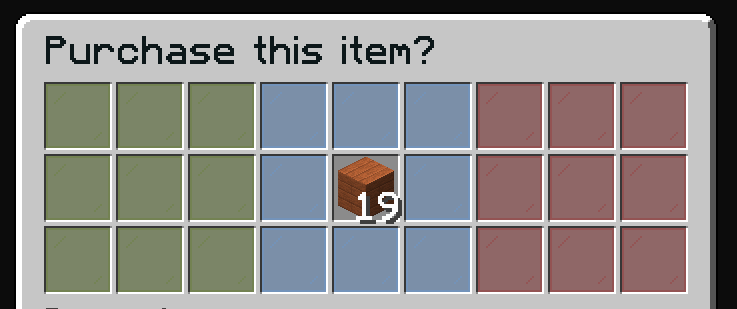
Fonctionnalites
- Previsualiser l'objet avant l'achat
- Voir le contenu des shulkers (si applicable)
- Confirmer ou annuler l'achat
Configuration par defaut
name: "#0c1719Purchase this item?"
size: 27

items:

  confirm:
    type: ZAUCTIONHOUSE_CONFIRM_PURCHASE
    slots:
      - 0-2
      - 9-11
      - 18-20
    item:
      material: GREEN_STAINED_GLASS_PANE
      name: "#2CCED2<bold>ᴘᴜʀᴄʜᴀsᴇ"
      lore:
        - "#92ffffPurchase this item."
        - ""
        - "#8c8c8c• #2CCED2Click #92ffffto purchase"

  deny:
    type: BACK
    slots:
      - 6-8
      - 15-17
      - 24-26
    item:
      material: RED_STAINED_GLASS_PANE
      name: "#2CCED2<bold>ʙᴀᴄᴋ"
      lore:
        - "#92ffffGo back."
        - ""
        - "#8c8c8c• #2CCED2Click #92ffffto go back"

  decoration:
    slots:
      - 3-5
      - 12
      - 14
      - 21-23
    item:
      material: LIGHT_BLUE_STAINED_GLASS_PANE
      name: "#2CCED2"

  show:
    type: ZAUCTIONHOUSE_SHOW
    slot: 13

  shulker:
    type: ZAUCTIONHOUSE_SHULKER_OPEN
    slot: 4
    item:
      material: SHULKER_BOX
      name: "#2CCED2<bold>ᴠɪᴇᴡ sʜᴜʟᴋᴇʀ ᴄᴏɴᴛᴇɴᴛ"
      lore:
        - "#92ffffView the content of shulker boxes."
        - ""
        - "#8c8c8c• #2CCED2Click #92ffffto view content"
Boutons utilises
| Bouton | Type | Description |
|---|---|---|
confirm | ZAUCTIONHOUSE_CONFIRM_PURCHASE | Confirme l'achat |
deny | BACK | Retourne a l'hotel des ventes |
decoration | (statique) | Decoration visuelle |
show | ZAUCTIONHOUSE_SHOW | Affiche l'objet |
shulker | ZAUCTIONHOUSE_SHULKER_OPEN | Ouvre la previsualisation du shulker |
Previsualisation du Shulker
Le bouton shulker n'apparait que lorsque l'objet achete est ou contient des boites shulker. Cliquer dessus ouvre l'inventaire Contenu du Shulker.