
Inventories
Confirmation de Retrait en Masse
Configuration de l'inventaire de confirmation de retrait en masse
L'inventaire de confirmation de retrait en masse confirme le retrait de plusieurs objets de la vente (ventes groupees). Il affiche tous les objets qui seront retires et retournes au vendeur.
Fichier : plugins/zAuctionHouse/inventories/confirms/remove-inventory-confirm.yml
Acces : S'ouvre automatiquement lorsqu'un vendeur clique sur son propre lot en vente (si open-confirm-inventory est true)
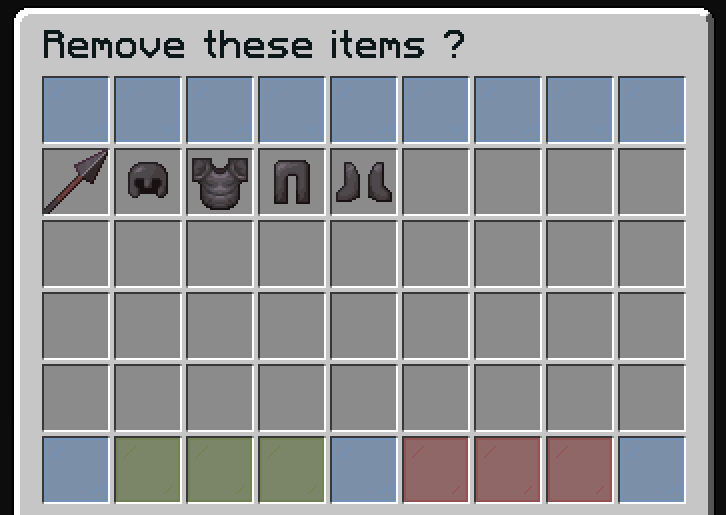
Fonctionnalites
- Previsualiser tous les objets de la vente groupee avant le retrait
- Voir le contenu des shulkers (si applicable)
- Un seul clic pour retirer tous les objets de la vente
Configuration par defaut
name: "#0c1719Remove these items ?"
size: 54

patterns:
  - 'zauctionhouse-decoration'

items:

  item-content:
    type: ZAUCTIONHOUSE_ITEM_CONTENT
    slots:
      - 9-44

  confirm:
    type: ZAUCTIONHOUSE_CONFIRM_REMOVE_LISTED
    slots:
      - 46-48
    item:
      material: GREEN_STAINED_GLASS_PANE
      name: "#2CCED2<bold>ʀᴇᴍᴏᴠᴇ"
      lore:
        - "#92ffffRemove this item."
        - ""
        - "#8c8c8c• #2CCED2Click #92ffffto remove"

  deny:
    type: BACK
    slots:
      - 50-52
    item:
      material: RED_STAINED_GLASS_PANE
      name: "#2CCED2<bold>ʙᴀᴄᴋ"
      lore:
        - "#92ffffGo back."
        - ""
        - "#8c8c8c• #2CCED2Click #92ffffto go back"

  shulker:
    type: ZAUCTIONHOUSE_SHULKER_OPEN
    slot: 49
    item:
      material: SHULKER_BOX
      name: "#2CCED2<bold>ᴠɪᴇᴡ sʜᴜʟᴋᴇʀ ᴄᴏɴᴛᴇɴᴛ"
      lore:
        - "#92ffffView the content of shulker boxes."
        - ""
        - "#8c8c8c• #2CCED2Click #92ffffto view content"
Boutons utilises
| Bouton | Type | Description |
|---|---|---|
item-content | ZAUCTIONHOUSE_ITEM_CONTENT | Affiche tous les objets de la vente groupee |
confirm | ZAUCTIONHOUSE_CONFIRM_REMOVE_LISTED | Confirme le retrait de tous les objets |
deny | BACK | Retourne a l'hotel des ventes |
shulker | ZAUCTIONHOUSE_SHULKER_OPEN | Ouvre la previsualisation du shulker |
Difference avec la confirmation d'objet unique
| Caracteristique | Objet unique | Objets groupes |
|---|---|---|
| Inventaire | remove-confirm.yml | remove-inventory-confirm.yml |
| Taille | 27 emplacements (3 lignes) | 54 emplacements (6 lignes) |
| Affichage de l'objet | Un seul objet au centre | Tous les objets dans une grille de 36 emplacements |
| Type de bouton | ZAUCTIONHOUSE_SHOW | ZAUCTIONHOUSE_ITEM_CONTENT |
Desactiver la confirmation
Pour desactiver la boite de dialogue de confirmation et retirer les objets directement :
# In config.yml
open-confirm-inventory: false