
Contenu des Conteneurs
Configuration de l'inventaire de previsualisation du contenu des conteneurs
L'inventaire du contenu des conteneurs affiche le contenu des objets conteneurs en vente, permettant aux acheteurs de previsualiser ce qu'ils contiennent avant d'acheter. Cela fonctionne avec les boites de shulker vanilla et les conteneurs geres par des plugins (AxShulkers, etc.).
Fichier : plugins/zAuctionHouse/inventories/shulker-content.yml
Acces : Cliquer sur le bouton "Voir le Contenu" dans la confirmation d'achat/retrait
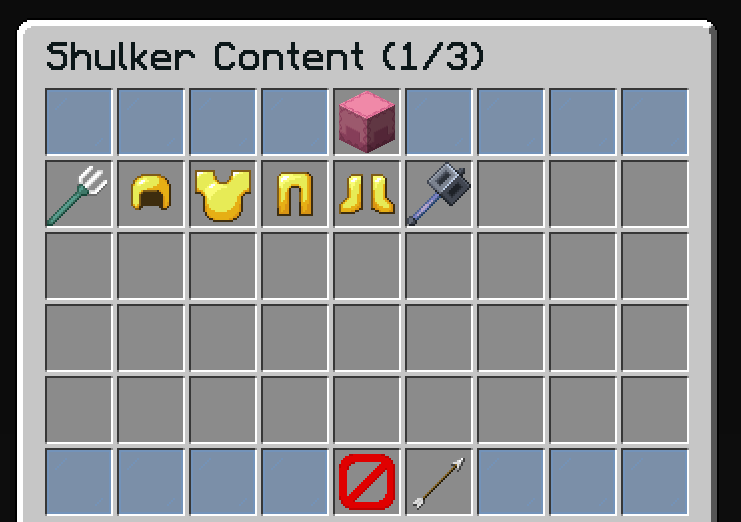
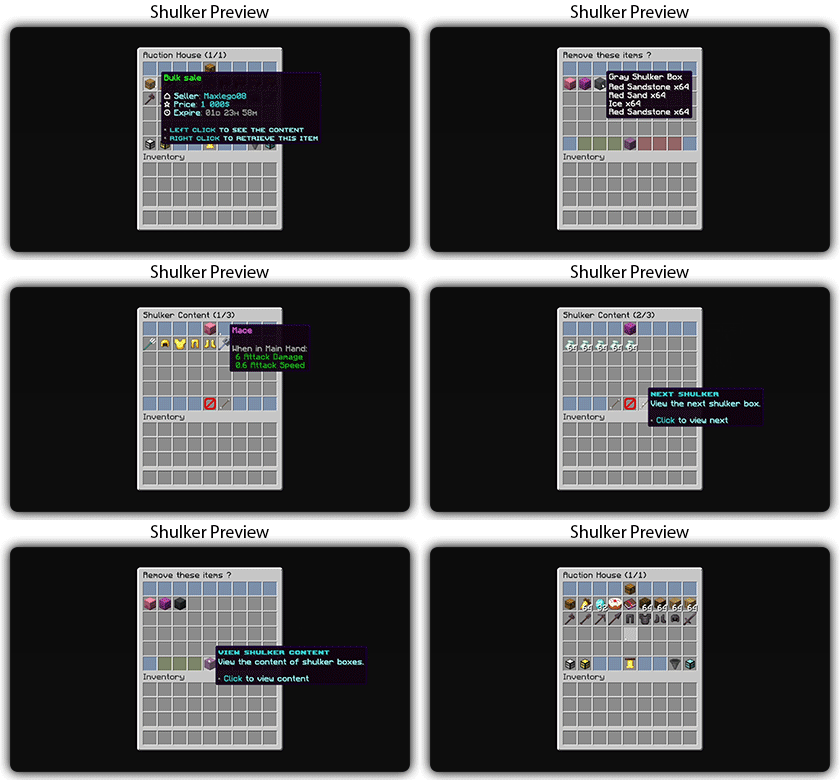
Types de Conteneurs Supportes
| Conteneur | Plugin Requis | Description |
|---|---|---|
| Boites de shulker vanilla | Aucun | Boites de shulker Minecraft natives |
| AxShulkers | AxShulkers | Boites de shulker avec contenu stocke exterieurement |
Des types de conteneurs supplementaires peuvent etre ajoutes par des plugins externes via l'API ItemContentProvider.
Fonctionnalites
- Previsualiser tous les objets a l'interieur des conteneurs (boites de shulker, AxShulkers, etc.)
- Naviguer entre plusieurs conteneurs (ventes groupees)
- Mode consultation uniquement - les objets ne peuvent pas etre pris
Configuration par defaut
name: "#0c1719Shulker Content (%shulker-current%/%shulker-total%)"
size: 54

patterns:
  - 'zauctionhouse-decoration'
  - 'zauctionhouse-back'

items:

  content:
    type: ZAUCTIONHOUSE_SHULKER_CONTENT
    slots:
      - 9-17
      - 18-26
      - 27-35
      - 36-44

  shulker-info:
    type: ZAUCTIONHOUSE_SHULKER_INFO
    slot: 4
    item:
      material: SHULKER_BOX
      name: "#2CCED2<bold>sʜᴜʟᴋᴇʀ ʙᴏx"
      lore:
        - "#92ffffViewing shulker #2CCED2%shulker_current% #92ffffof #2CCED2%shulker_total%"
        - ""
        - "#8c8c8c• Use navigation buttons to switch"

  previous:
    type: ZAUCTIONHOUSE_SHULKER_NAVIGATION
    direction: previous
    slot: 48
    item:
      material: ARROW
      name: "#2CCED2<bold>ᴘʀᴇᴠɪᴏᴜs sʜᴜʟᴋᴇʀ"
      lore:
        - "#92ffffView the previous shulker box."
        - ""
        - "#8c8c8c• #2CCED2Click #92ffffto view previous"

  next:
    type: ZAUCTIONHOUSE_SHULKER_NAVIGATION
    direction: next
    slot: 50
    item:
      material: ARROW
      name: "#2CCED2<bold>ɴᴇxᴛ sʜᴜʟᴋᴇʀ"
      lore:
        - "#92ffffView the next shulker box."
        - ""
        - "#8c8c8c• #2CCED2Click #92ffffto view next"
Boutons utilises
| Bouton | Type | Description |
|---|---|---|
content | ZAUCTIONHOUSE_SHULKER_CONTENT | Affiche le contenu du conteneur |
shulker-info | ZAUCTIONHOUSE_SHULKER_INFO | Affiche les informations du conteneur |
previous | ZAUCTIONHOUSE_SHULKER_NAVIGATION | Conteneur precedent |
next | ZAUCTIONHOUSE_SHULKER_NAVIGATION | Conteneur suivant |
Motifs utilises
| Motif | Description |
|---|---|
zauctionhouse-decoration | Bordures en vitres |
zauctionhouse-back | Bouton retour |
Placeholders
| Placeholder | Description |
|---|---|
%shulker-current% | Numero du shulker actuellement consulte (commence a 1) |
%shulker-total% | Nombre total de shulkers dans la vente |
%shulker_current% | Identique au precedent (format alternatif) |
%shulker_total% | Identique au precedent (format alternatif) |
Conteneurs multiples
Lorsqu'une vente groupee contient plusieurs objets conteneurs, les joueurs peuvent naviguer entre eux a l'aide des boutons precedent/suivant.
Les boutons de navigation ne sont actifs que lorsqu'il y a plusieurs conteneurs :
- Precedent : Desactive sur le premier conteneur
- Suivant : Desactive sur le dernier conteneur