
InventoriesAdmin
Admin Objets Expirés
Configuration de l'inventaire admin des objets expirés
L'inventaire admin des objets expirés permet aux administrateurs de voir et gérer les objets expirés d'un joueur.
Fichier : plugins/zAuctionHouse/inventories/admin/admin-expired-items.yml
Accès :
- Depuis le menu principal de l'historique admin → Bouton Objets Expirés
/ah admin open expired <joueur>
Permission : Nécessite la permission administrateur
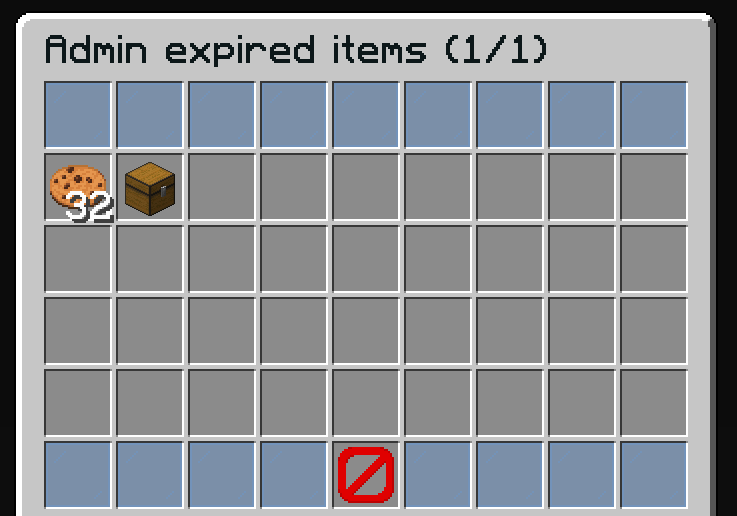
Actions Admin
- Voir tous les objets expirés du joueur ciblé
- Récupérer des objets pour les rendre au joueur
- Utile pour récupérer des objets après des plaintes de joueurs
Configuration par Défaut
name: '#0c1719Admin expired items (%page%/%max-page%)'
size: 54

patterns:
  - 'zauctionhouse-decoration'
  - 'zauctionhouse-pagination'
  - 'zauctionhouse-back'

items:

  items:
    type: ZAUCTIONHOUSE_ADMIN_EXPIRED_ITEMS
    slots:
      - 9-17
      - 18-26
      - 27-35
      - 36-44
    else:
      slots:
        - 22
      item:
        material: BARRIER
        name: '#ff0000&nNo Items Found'
Boutons Utilisés
| Bouton | Type | Description |
|---|---|---|
items | ZAUCTIONHOUSE_ADMIN_EXPIRED_ITEMS | Affiche les objets expirés avec récupération admin |
Patterns Utilisés
| Pattern | Description |
|---|---|
zauctionhouse-decoration | Bordures en panneaux de verre |
zauctionhouse-pagination | Boutons page précédente/suivante |
zauctionhouse-back | Bouton retour vers l'historique admin |
Actions au Clic
Lorsqu'un administrateur clique sur un objet :
- L'objet est récupéré et donné à l'administrateur
- L'administrateur peut ensuite le donner au joueur manuellement
Placeholders
| Placeholder | Description |
|---|---|
%page% | Numéro de page actuel |
%max-page% | Nombre total de pages |