
InventoriesAdmin
Admin Objets en Vente
Configuration de l'inventaire admin des objets en vente
L'inventaire admin des objets en vente permet aux administrateurs de voir et gérer les annonces actives d'un joueur.
Fichier : plugins/zAuctionHouse/inventories/admin/admin-selling-items.yml
Accès :
- Depuis le menu principal de l'historique admin → Bouton Objets en Vente
/ah admin open selling <joueur>
Permission : Nécessite la permission administrateur
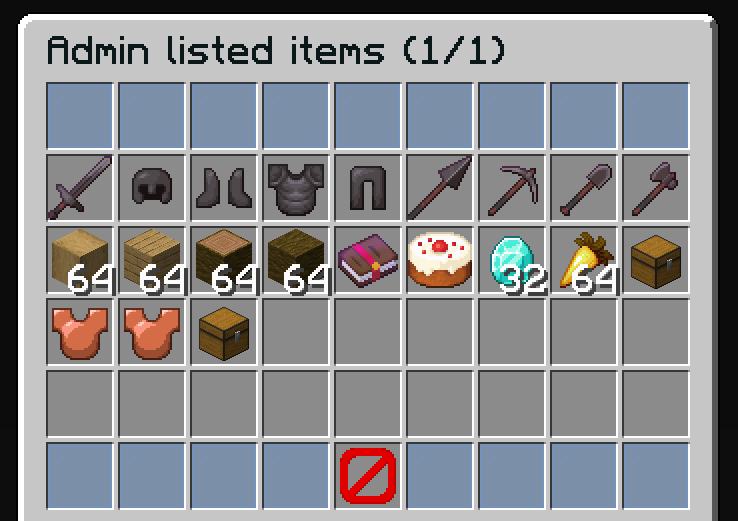
Actions Admin
- Voir tous les objets actuellement en vente par le joueur ciblé
- Retirer des objets de la vente (annuler l'annonce)
- Utile pour supprimer des annonces inappropriées ou des arnaques
Configuration par Défaut
name: '#0c1719Admin listed items (%page%/%max-page%)'
size: 54

patterns:
  - 'zauctionhouse-decoration'
  - 'zauctionhouse-pagination'
  - 'zauctionhouse-back'

items:

  items:
    type: ZAUCTIONHOUSE_ADMIN_SELLING_ITEMS
    slots:
      - 9-17
      - 18-26
      - 27-35
      - 36-44
    else:
      slots:
        - 22
      item:
        material: BARRIER
        name: '#ff0000&nNo Items Found'
Boutons Utilisés
| Bouton | Type | Description |
|---|---|---|
items | ZAUCTIONHOUSE_ADMIN_SELLING_ITEMS | Affiche les objets en vente avec retrait admin |
Patterns Utilisés
| Pattern | Description |
|---|---|
zauctionhouse-decoration | Bordures en panneaux de verre |
zauctionhouse-pagination | Boutons page précédente/suivante |
zauctionhouse-back | Bouton retour vers l'historique admin |
Actions au Clic
Lorsqu'un administrateur clique sur un objet :
- L'objet est retiré de la vente
- L'objet est déplacé vers les objets expirés du joueur ciblé
- Le joueur ciblé peut le récupérer depuis là
Placeholders
| Placeholder | Description |
|---|---|
%page% | Numéro de page actuel |
%max-page% | Nombre total de pages |