
Discord Webhooks
Configure Discord webhook notifications in zAuctionHouse V4
zAuctionHouse V4 can send notifications to Discord when items are listed or purchased. Configure webhooks in discord.yml.
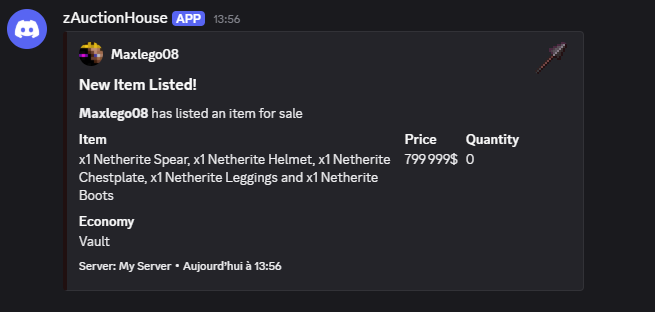
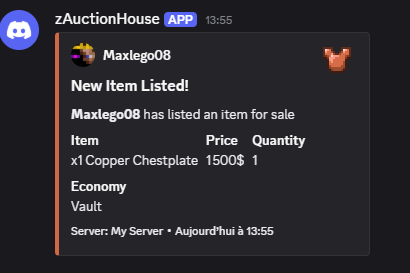
Setup
- In Discord, go to Server Settings → Integrations → Webhooks
- Create a new webhook and copy the webhook URL
- Paste the URL in
discord.yml - Enable the webhook and customize the embed
Keep your webhook URL private! Anyone with this URL can post to your channel.
Global Settings
# Enable/disable all Discord notifications
enabled: false

# Server name for multi-server setups
server-name: "My Server"
Item Image Settings
This section allows you to display the item image in the Discord embed. You can also extract the dominant color from the image to use as the embed color.
# URL pattern for item icons
# %item_material% is replaced with material name (lowercase)
item-image-url: "https://img.groupez.dev/minecraft/%item_material%.png"

# Extract dominant color from item images
# Adds HTTP requests - may increase latency
extract-dominant-color: false

# Default embed color when extraction is disabled/fails
default-color: "#5865F2"
Custom Item Images
By default the embed image is built from the material-based item-image-url pattern, so every item of the same material shares the same picture. This is a problem for custom items (ItemsAdder, Oraxen, Nexo, MMOItems…) whose underlying material is generic (e.g. PAPER).
The custom-images section lets you override %item_image_url% for specific items. Each entry pairs a rule (how to recognize the item, using the exact same format as categories.yml / rules.yml) with an image URL. The first matching rule wins, so put the most specific rules first. Items that match no rule fall back to the item-image-url pattern.
custom-images:
  - rule:
      type: oraxen
      items:
        - ruby_sword
    image: "https://example.com/images/ruby_sword.png"
  - rule:
      type: material
      materials:
        - DIAMOND_SWORD
    image: "https://example.com/images/diamond_sword.png"
  - rule:
      type: custom-model-data
      values:
        - 10001
    image: "https://example.com/images/legendary.png"
Common rule types:
| Type | Fields | Example |
|---|---|---|
material | materials: [...] | materials: [DIAMOND_SWORD, NETHERITE_SWORD] |
name | mode: CONTAINS|EQUALS, values: [...] | mode: CONTAINS / values: ["Excalibur"] |
lore | mode: CONTAINS|EQUALS, values: [...] | mode: CONTAINS / values: ["Legendary"] |
custom-model-data | values: [...] or ranges: [{min, max}] | values: [10001] |
oraxen / nexo | items: [...] | items: [ruby_sword] |
itemsadder | items: [...] | items: ["mynamespace:ruby_sword"] |
mmoitems | items: [...] | items: ["SWORD:EXCALIBUR"] |
%item_image_url% is used by both the thumbnail (small, top-right) and image (large, bottom) embed fields. To show the custom image as the large bottom image, set image.url: "%item_image_url%".
When extract-dominant-color is enabled, the extracted color is cached per image URL for custom images (instead of per material), so two custom items sharing the same material but different images no longer collide on the same color.
Webhook Configuration
Sell Webhook
Sent when a player lists a new item:
webhooks:
  sell:
    enabled: false
    url: "https://discord.com/api/webhooks/YOUR_ID/YOUR_TOKEN"

    # Custom bot appearance
    username: "zAuctionHouse"
    avatar-url: ""

    # Message above the embed
    content: ""

    embed:
      title: "New Item Listed!"
      description: "**%seller_name%** has listed an item for sale"
      color: "#00FF00"

      fields:
        - name: "Item"
          value: "%item_display%"
          inline: true
        - name: "Price"
          value: "%formatted_price%"
          inline: true
        - name: "Quantity"
          value: "%item_amount%"
          inline: true
        - name: "Economy"
          value: "%economy_display_name%"
          inline: true

      footer:
        text: "Server: %server_name%"
        icon-url: ""

      author:
        name: "%seller_name%"
        url: ""
        icon-url: "https://mc-heads.net/avatar/%seller_uuid%"

      thumbnail:
        url: "%item_image_url%"

      image:
        url: ""

      timestamp: true
Purchase Webhook
Sent when a player purchases an item:
  purchase:
    enabled: false
    url: "https://discord.com/api/webhooks/YOUR_ID/YOUR_TOKEN"
    username: "zAuctionHouse"
    avatar-url: ""
    content: ""

    embed:
      title: "Item Purchased!"
      description: "**%buyer_name%** has purchased an item from **%seller_name%**"
      color: "#FFD700"

      fields:
        - name: "Item"
          value: "%item_display%"
          inline: true
        - name: "Price"
          value: "%formatted_price%"
          inline: true
        - name: "Buyer"
          value: "%buyer_name%"
          inline: true
        - name: "Seller"
          value: "%seller_name%"
          inline: true

      footer:
        text: "Server: %server_name%"
        icon-url: ""

      author:
        name: "%buyer_name%"
        url: ""
        icon-url: "https://mc-heads.net/avatar/%buyer_uuid%"

      thumbnail:
        url: "%item_image_url%"

      image:
        url: ""

      timestamp: true
Available Placeholders
Item Placeholders
| Placeholder | Description |
|---|---|
%item_id% | Internal item ID |
%item_material% | Material name (lowercase, e.g., "diamond_sword") |
%item_display% | Item display name with formatting |
%item_amount% | Stack size |
%item_lore% | Item lore |
%item_enchantments% | List of enchantments |
%item_custom_model_data% | CustomModelData value |
%item_dominant_color% | Extracted dominant color |
%item_image_url% | Full URL to item image (uses the custom-images override when the item matches a rule) |
Player Placeholders
| Placeholder | Description |
|---|---|
%seller_name% | Seller's username |
%seller_uuid% | Seller's UUID |
%buyer_name% | Buyer's username (purchase only) |
%buyer_uuid% | Buyer's UUID (purchase only) |
Price Placeholders
| Placeholder | Description |
|---|---|
%price% | Raw price number |
%formatted_price% | Price with formatting (e.g., "1,000$") |
%economy_name% | Economy internal name |
%economy_display_name% | Economy display name |
Time Placeholders
| Placeholder | Description |
|---|---|
%created_at% | When listing was created |
%expires_at% | When the listing expires — output as a Discord dynamic timestamp (<t:unix_seconds:f>), rendered in each viewer's local timezone |
%remaining_time% | Time until expiration |
%timestamp% | Current timestamp |
Server Placeholders
| Placeholder | Description |
|---|---|
%server_name% | Server name from config |
Category Placeholders
| Placeholder | Description |
|---|---|
%category_names% | Comma-separated category names |
%category_count% | Number of matching categories |
Embed Customization
Colors
Use hex format: #RRGGBB
color: "#00FF00"  # Green for sales
color: "#FFD700"  # Gold for purchases
color: "#FF0000"  # Red for errors
Or use dynamic colors:
color: "%item_dominant_color%" # Requires extract-dominant-color: trueFields
Each field has:
name: Bold title (max 256 chars)value: Content (max 1024 chars)inline:true= side by side,false= full width
Maximum 25 fields per embed.
fields:
  - name: "Item"
    value: "%item_display%"
    inline: true
  - name: "Details"
    value: "Listed on %server_name%"
    inline: false
Author
Displays above the title with icon:
author:
  name: "%seller_name%"
  url: "https://yourserver.com/profile/%seller_uuid%"
  icon-url: "https://mc-heads.net/avatar/%seller_uuid%"
Footer
Small text at bottom:
footer:
  text: "Server: %server_name%"
  icon-url: "https://yourserver.com/icon.png"
Images
# Small image on right
thumbnail:
  url: "%item_image_url%"

# Large image at bottom
image:
  url: ""
Timestamp
Shows current time in user's local timezone:
timestamp: trueDiscord Mentions
Use in content field:
content: "<@USER_ID>"           # Mention user
content: "<@&ROLE_ID>"          # Mention role
content: "@everyone"            # Mention everyone
content: "@here"                # Mention online users
Full Example
enabled: true
server-name: "SkyBlock"

item-image-url: "https://img.groupez.dev/minecraft/%item_material%.png"
extract-dominant-color: false
default-color: "#5865F2"

webhooks:
  sell:
    enabled: true
    url: "https://discord.com/api/webhooks/123456/abcdef"
    username: "Auction House"
    avatar-url: ""
    content: ""

    embed:
      title: "New Listing!"
      description: "**%seller_name%** listed **%item_display%** x%item_amount%"
      color: "#00FF00"

      fields:
        - name: "Price"
          value: "%formatted_price%"
          inline: true
        - name: "Expires"
          value: "%remaining_time%"
          inline: true

      footer:
        text: "%server_name% Auction House"

      author:
        name: "%seller_name%"
        icon-url: "https://mc-heads.net/avatar/%seller_uuid%"

      thumbnail:
        url: "%item_image_url%"

      timestamp: true

  purchase:
    enabled: true
    url: "https://discord.com/api/webhooks/123456/abcdef"
    username: "Auction House"

    embed:
      title: "Item Sold!"
      description: "**%buyer_name%** bought from **%seller_name%**"
      color: "#FFD700"

      fields:
        - name: "Item"
          value: "%item_display%"
          inline: true
        - name: "Price"
          value: "%formatted_price%"
          inline: true

      author:
        name: "%buyer_name%"
        icon-url: "https://mc-heads.net/avatar/%buyer_uuid%"

      thumbnail:
        url: "%item_image_url%"

      timestamp: true
Tips
- Use
%item_dominant_color%for dynamic embed colors matching the item - Keep embed field values short to avoid Discord's character limits
- Test your webhook configuration with a private channel first
- Use different webhook URLs for different event types if needed