
Inventories
History
Sales history inventory configuration
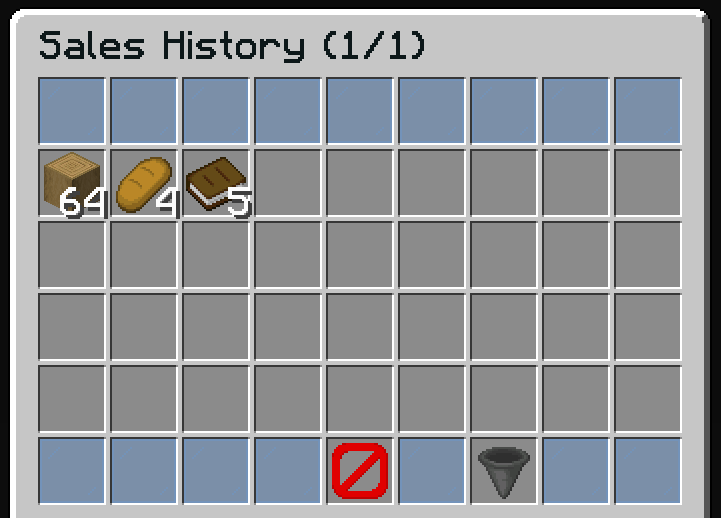
The history inventory displays the player's completed sales. This is a read-only view showing all items the player has sold.
File: plugins/zAuctionHouse/inventories/history.yml
Access: /ah history
Features
- View all items you have sold
- See who bought each item and when
- Sort by date, price, or buyer name
- Historical data is kept based on configuration
Default Configuration
name: '#0c1719Sales History (%page%/%max-page%)'
size: 54

patterns:
  - 'zauctionhouse-decoration'
  - 'zauctionhouse-pagination'
  - 'zauctionhouse-back'

items:

  items:
    type: ZAUCTIONHOUSE_HISTORY_ITEMS
    loading-slot: 22
    slots:
      - 9-17
      - 18-26
      - 27-35
      - 36-44
    item:
      material: BARRIER
      name: "#ff0000Loading..."
    else:
      slots:
        - 22
      item:
        material: BARRIER
        name: '#ff0000&nNo Sales Found'
        lore:
          - ''
          - '&7You have not sold any items yet.'

  sort:
    type: ZAUCTIONHOUSE_HISTORY_SORT
    slot: 51
    enable-text: ' #F27438➜ %sorting%'
    disable-text: ' #76CDCD➜ %sorting%'
    sorts:
      - DATE_DESC
      - DATE_ASC
      - PRICE_DESC
      - PRICE_ASC
      - BUYER_ASC
      - BUYER_DESC
    sort-names:
      DATE_DESC: "Newest First"
      DATE_ASC: "Oldest First"
      PRICE_DESC: "Highest Price"
      PRICE_ASC: "Lowest Price"
      BUYER_ASC: "Buyer A-Z"
      BUYER_DESC: "Buyer Z-A"
    item:
      material: HOPPER
      name: "#2CCED2<bold>sᴏʀᴛ"
      lore:
        - "#92ffffAvailable sort types:"
        - "%DATE_DESC%"
        - "%DATE_ASC%"
        - "%PRICE_DESC%"
        - "%PRICE_ASC%"
        - "%BUYER_ASC%"
        - "%BUYER_DESC%"
        - ""
        - "#8c8c8c• #2CCED2Click #92ffffto change the sort type"
Buttons Used
| Button | Type | Description |
|---|---|---|
items | ZAUCTIONHOUSE_HISTORY_ITEMS | Displays sales history |
sort | ZAUCTIONHOUSE_HISTORY_SORT | Changes sort order |
Patterns Used
| Pattern | Description |
|---|---|
zauctionhouse-decoration | Glass pane borders |
zauctionhouse-pagination | Previous/Next page buttons |
zauctionhouse-back | Back button to return |
Placeholders
| Placeholder | Description |
|---|---|
%page% | Current page number |
%max-page% | Total number of pages |
Sort Options
| Sort | Description |
|---|---|
DATE_DESC | Newest sales first |
DATE_ASC | Oldest sales first |
PRICE_DESC | Highest price first |
PRICE_ASC | Lowest price first |
BUYER_ASC | Buyer name A-Z |
BUYER_DESC | Buyer name Z-A |
Loading State
The history inventory loads data asynchronously. During loading:
- The
loading-slotdisplays the loading placeholder - Once loaded, items are displayed normally
- The
elseconfiguration is shown when no history exists