
Inventories
Sell
Sell inventory configuration for listing items
The sell inventory allows players to list items for sale through a GUI interface.
File: plugins/zAuctionHouse/inventories/sell-inventory.yml
Access: /ah sell (when enable-sell-inventory is true in config.yml)
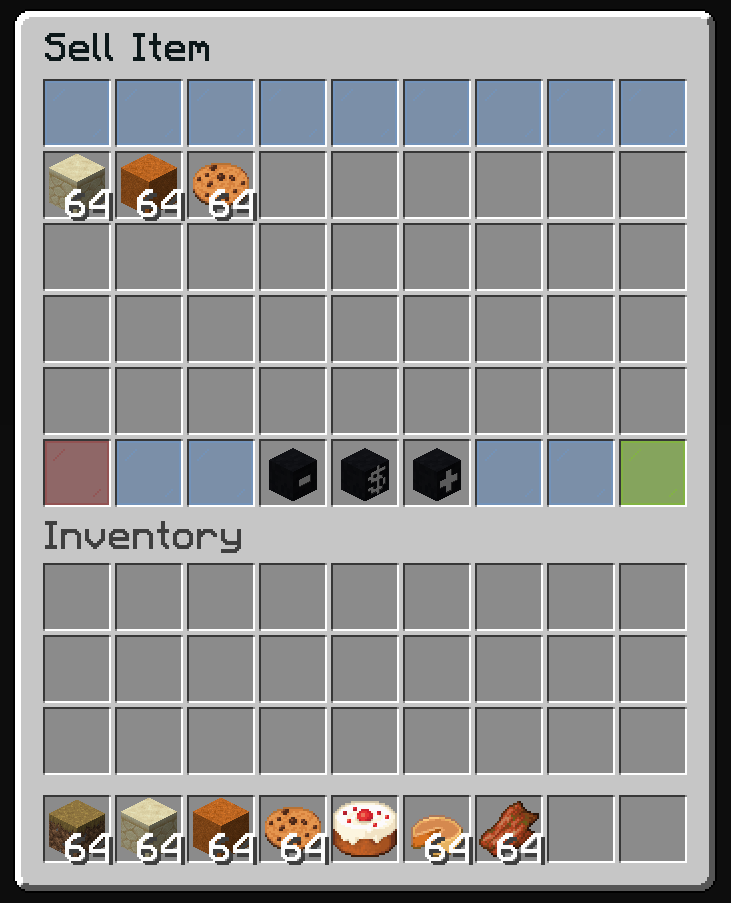
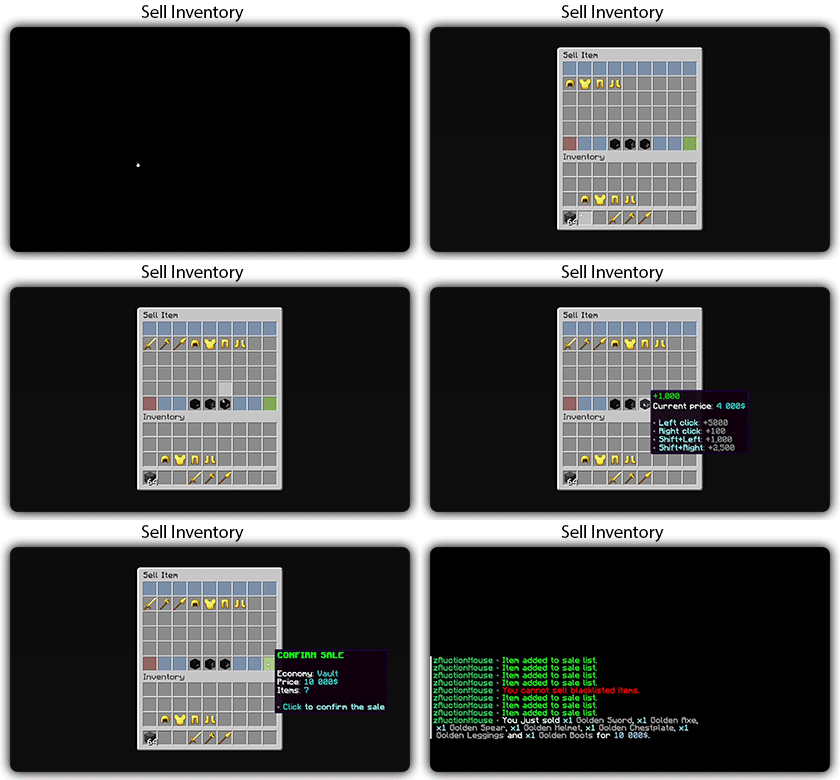
Preview
The sell inventory includes:
- Item display area (shows selected items)
- Price adjustment buttons (increase/decrease)
- Economy selector (if multiple economies enabled)
- Confirm and cancel buttons
Default Configuration
name: "#0c1719Sell Item"
size: 54

patterns:
  - 'zauctionhouse-decoration'

items:

  show-item:
    type: ZAUCTIONHOUSE_SELL_SHOW_ITEM
    slots:
      - 9-44
    empty-slot: 22
    item:
      material: BARRIER
      name: "#ff0000<bold>No Item Selected"
      lore:
        - ""
        - "#8c8c8cHold an item in your hand"
        - "#8c8c8cor select items from your inventory"

  cancel:
    type: ZAUCTIONHOUSE_SELL_CANCEL
    slot: 45
    item:
      material: RED_STAINED_GLASS_PANE
      name: "#ff0000<bold>CANCEL"
      lore:
        - ""
        - "#8c8c8c• #2CCED2Click #92ffffto cancel and return items"

  private-decrease:
    type: ZAUCTIONHOUSE_SELL_PRICE
    slot: 48
    amounts:
      left-click: -500
      right-click: -100
      shift-left-click: -1000
      shift-right-click: -2500
    item:
      url: eyJ0ZXh0dXJlcyI6eyJTS0lOIjp7InVybCI6Imh0dHA6Ly90ZXh0dXJlcy5taW5lY3JhZnQubmV0L3RleHR1cmUvOTM1ZTRlMjZlYWZjMTFiNTJjMTE2NjhlMWQ2NjM0ZTdkMWQwZDIxYzQxMWNiMDg1ZjkzOTQyNjhlYjRjZGZiYSJ9fX0=
      name: "#ff3333-1,000"
      lore:
        - ""
        - "<white>Current price#8c8c8c: #2CCED2%price%"
        - ""
        - "#8c8c8c• #92ffffLeft click#8c8c8c: -500"
        - "#8c8c8c• #92ffffRight click#8c8c8c: -100"
        - "#8c8c8c• #92ffffShift+Left#8c8c8c: -1,000"
        - "#8c8c8c• #92ffffShift+Right#8c8c8c: -2,500"

  select-economy:
    type: ZAUCTIONHOUSE_SELL_ECONOMY
    slot: 49
    item:
      url: eyJ0ZXh0dXJlcyI6eyJTS0lOIjp7InVybCI6Imh0dHA6Ly90ZXh0dXJlcy5taW5lY3JhZnQubmV0L3RleHR1cmUvNGU3NGQ2NDcyZjgxMWVlN2U1ZTgwNWVhOTNkN2I0Yzc2MWM2NmE2NGU1OTM3MDJmYzgwNzNkYjM1N2YwNDY0ZCJ9fX0=
      name: "#ffd700<bold>Economy"
      lore:
        - ""
        - "<white>Current#8c8c8c: #2CCED2%economy%"
        - ""
        - "#8c8c8c• #92ffffLeft click#8c8c8c: Next economy"
        - "#8c8c8c• #92ffffRight click#8c8c8c: Previous economy"

  price-increase:
    type: ZAUCTIONHOUSE_SELL_PRICE
    amounts:
      left-click: 500
      right-click: 100
      shift-left-click: 1000
      shift-right-click: 2500
    slot: 50
    item:
      url: eyJ0ZXh0dXJlcyI6eyJTS0lOIjp7InVybCI6Imh0dHA6Ly90ZXh0dXJlcy5taW5lY3JhZnQubmV0L3RleHR1cmUvOWEyZDg5MWM2YWU5ZjZiYWEwNDBkNzM2YWI4NGQ0ODM0NGJiNmI3MGQ3ZjFhMjgwZGQxMmNiYWM0ZDc3NyJ9fX0=
      name: '#00cc00+1,000'
      lore:
        - '<white>Current price#8c8c8c: #2CCED2%price%'
        - ''
        - '#8c8c8c• #92ffffLeft click#8c8c8c: +500'
        - '#8c8c8c• #92ffffRight click#8c8c8c: +100'
        - '#8c8c8c• #92ffffShift+Left#8c8c8c: +1,000'
        - '#8c8c8c• #92ffffShift+Right#8c8c8c: +2,500'

  confirm:
    type: ZAUCTIONHOUSE_SELL_CONFIRM
    slot: 53
    item:
      material: LIME_STAINED_GLASS_PANE
      name: "#00ff00<bold>CONFIRM SALE"
      lore:
        - ""
        - "<white>Economy#8c8c8c: #2CCED2%economy%"
        - "<white>Price#8c8c8c: #2CCED2%price%"
        - "<white>Items#8c8c8c: #2CCED2%item_count%"
        - ""
        - "#8c8c8c• #2CCED2Click #92ffffto confirm the sale"
Buttons Used
| Button | Type | Description |
|---|---|---|
show-item | ZAUCTIONHOUSE_SELL_SHOW_ITEM | Displays selected items |
cancel | ZAUCTIONHOUSE_SELL_CANCEL | Cancels the sale |
private-decrease | ZAUCTIONHOUSE_SELL_PRICE | Decreases price |
price-increase | ZAUCTIONHOUSE_SELL_PRICE | Increases price |
select-economy | ZAUCTIONHOUSE_SELL_ECONOMY | Selects economy |
confirm | ZAUCTIONHOUSE_SELL_CONFIRM | Confirms sale |
Placeholders
| Placeholder | Description |
|---|---|
%price% | Current listing price |
%economy% | Selected economy name |
%item_count% | Number of items selected |
Customizing Price Increments
You can customize the price change amounts for each click type:
price-increase:
  type: ZAUCTIONHOUSE_SELL_PRICE
  amounts:
    left-click: 1000      # +1000 on left click
    right-click: 100      # +100 on right click
    shift-left-click: 10000  # +10000 on shift+left
    shift-right-click: 50000 # +50000 on shift+right
Use negative values for decrease buttons:
price-decrease:
  type: ZAUCTIONHOUSE_SELL_PRICE
  amounts:
    left-click: -1000
    right-click: -100
    shift-left-click: -10000
    shift-right-click: -50000