
Inventories
Purchase Confirm
Purchase confirmation inventory configuration
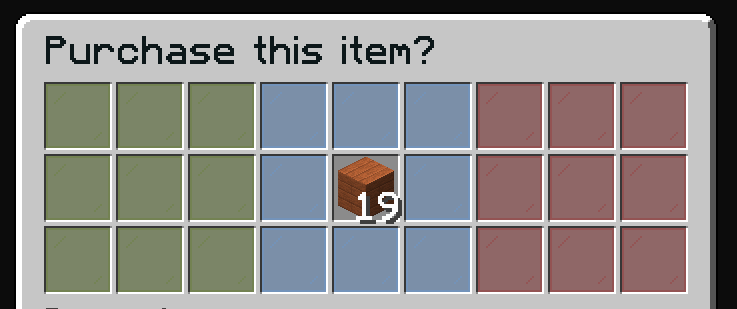
The purchase confirmation inventory asks players to confirm their purchase before completing the transaction.
File: plugins/zAuctionHouse/inventories/confirms/purchase-confirm.yml
Access: Automatically opens when clicking an item to buy in the auction house
Features
- Preview the item before buying
- View shulker contents (if applicable)
- Confirm or cancel the purchase
Default Configuration
name: "#0c1719Purchase this item?"
size: 27

items:

  confirm:
    type: ZAUCTIONHOUSE_CONFIRM_PURCHASE
    slots:
      - 0-2
      - 9-11
      - 18-20
    item:
      material: GREEN_STAINED_GLASS_PANE
      name: "#2CCED2<bold>ᴘᴜʀᴄʜᴀsᴇ"
      lore:
        - "#92ffffPurchase this item."
        - ""
        - "#8c8c8c• #2CCED2Click #92ffffto purchase"

  deny:
    type: BACK
    slots:
      - 6-8
      - 15-17
      - 24-26
    item:
      material: RED_STAINED_GLASS_PANE
      name: "#2CCED2<bold>ʙᴀᴄᴋ"
      lore:
        - "#92ffffGo back."
        - ""
        - "#8c8c8c• #2CCED2Click #92ffffto go back"

  decoration:
    slots:
      - 3-5
      - 12
      - 14
      - 21-23
    item:
      material: LIGHT_BLUE_STAINED_GLASS_PANE
      name: "#2CCED2"

  show:
    type: ZAUCTIONHOUSE_SHOW
    slot: 13

  shulker:
    type: ZAUCTIONHOUSE_SHULKER_OPEN
    slot: 4
    item:
      material: SHULKER_BOX
      name: "#2CCED2<bold>ᴠɪᴇᴡ sʜᴜʟᴋᴇʀ ᴄᴏɴᴛᴇɴᴛ"
      lore:
        - "#92ffffView the content of shulker boxes."
        - ""
        - "#8c8c8c• #2CCED2Click #92ffffto view content"
Buttons Used
| Button | Type | Description |
|---|---|---|
confirm | ZAUCTIONHOUSE_CONFIRM_PURCHASE | Confirms purchase |
deny | BACK | Returns to auction |
decoration | (static) | Visual decoration |
show | ZAUCTIONHOUSE_SHOW | Displays the item |
shulker | ZAUCTIONHOUSE_SHULKER_OPEN | Opens shulker preview |
Shulker Preview
The shulker button only appears when the item being purchased is or contains shulker boxes. Clicking it opens the Shulker Content inventory.