
Inventories
Remove Inventory Confirm
Bulk remove confirmation inventory configuration
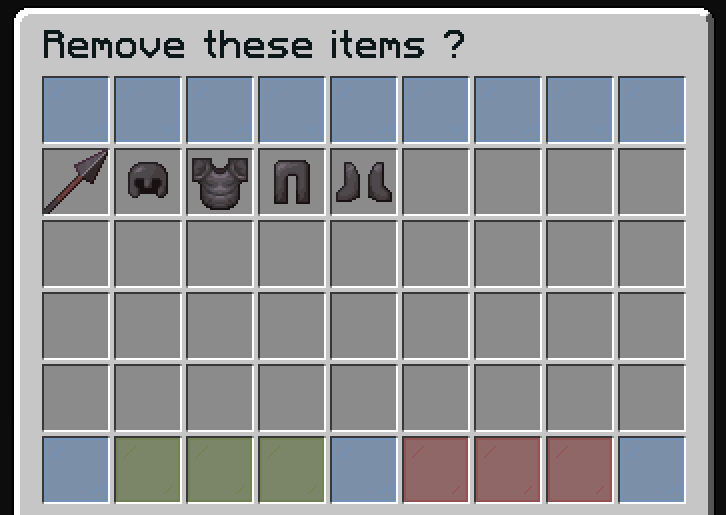
The bulk remove confirmation inventory confirms removal of multiple items from sale (bulk sales). It shows all items that will be removed and returned to the seller.
File: plugins/zAuctionHouse/inventories/confirms/remove-inventory-confirm.yml
Access: Automatically opens when a seller clicks their own bulk listing (if open-confirm-inventory is true)
Features
- Preview all items in the bulk sale before removal
- View shulker contents (if applicable)
- Single click to remove all items from sale
Default Configuration
name: "#0c1719Remove these items ?"
size: 54

patterns:
  - 'zauctionhouse-decoration'

items:

  item-content:
    type: ZAUCTIONHOUSE_ITEM_CONTENT
    slots:
      - 9-44

  confirm:
    type: ZAUCTIONHOUSE_CONFIRM_REMOVE_LISTED
    slots:
      - 46-48
    item:
      material: GREEN_STAINED_GLASS_PANE
      name: "#2CCED2<bold>ʀᴇᴍᴏᴠᴇ"
      lore:
        - "#92ffffRemove this item."
        - ""
        - "#8c8c8c• #2CCED2Click #92ffffto remove"

  deny:
    type: BACK
    slots:
      - 50-52
    item:
      material: RED_STAINED_GLASS_PANE
      name: "#2CCED2<bold>ʙᴀᴄᴋ"
      lore:
        - "#92ffffGo back."
        - ""
        - "#8c8c8c• #2CCED2Click #92ffffto go back"

  shulker:
    type: ZAUCTIONHOUSE_SHULKER_OPEN
    slot: 49
    item:
      material: SHULKER_BOX
      name: "#2CCED2<bold>ᴠɪᴇᴡ sʜᴜʟᴋᴇʀ ᴄᴏɴᴛᴇɴᴛ"
      lore:
        - "#92ffffView the content of shulker boxes."
        - ""
        - "#8c8c8c• #2CCED2Click #92ffffto view content"
Buttons Used
| Button | Type | Description |
|---|---|---|
item-content | ZAUCTIONHOUSE_ITEM_CONTENT | Displays all items in the bulk sale |
confirm | ZAUCTIONHOUSE_CONFIRM_REMOVE_LISTED | Confirms removal of all items |
deny | BACK | Returns to auction |
shulker | ZAUCTIONHOUSE_SHULKER_OPEN | Opens shulker preview |
Difference from Single Item Confirm
| Feature | Single Item | Bulk Items |
|---|---|---|
| Inventory | remove-confirm.yml | remove-inventory-confirm.yml |
| Size | 27 slots (3 rows) | 54 slots (6 rows) |
| Item display | Single item in center | All items in 36-slot grid |
| Button type | ZAUCTIONHOUSE_SHOW | ZAUCTIONHOUSE_ITEM_CONTENT |
Disabling Confirmation
To disable the confirmation dialog and remove items directly:
# In config.yml
open-confirm-inventory: false