
Inventories
Purchase Inventory Confirm
Bulk purchase confirmation inventory configuration
The bulk purchase confirmation inventory confirms purchase of multiple items (bulk sales). It shows all items in the sale with a preview before purchase.
File: plugins/zAuctionHouse/inventories/confirms/purchase-inventory-confirm.yml
Access: Automatically opens when clicking a bulk item to buy (indicated by a chest icon)
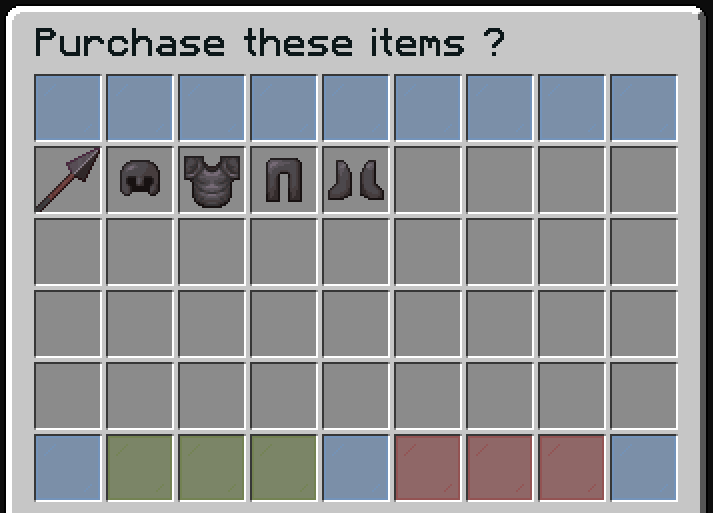
Features
- Preview all items in the bulk sale
- View shulker contents (if applicable)
- Single click to confirm purchase of all items
Default Configuration
name: "#0c1719Purchase these items ?"
size: 54

patterns:
  - 'zauctionhouse-decoration'

items:

  item-content:
    type: ZAUCTIONHOUSE_ITEM_CONTENT
    slots:
      - 9-44

  confirm:
    type: ZAUCTIONHOUSE_CONFIRM_PURCHASE
    slots:
      - 46-48
    item:
      material: GREEN_STAINED_GLASS_PANE
      name: "#2CCED2<bold>ᴘᴜʀᴄʜᴀsᴇ"
      lore:
        - "#92ffffPurchase this item."
        - ""
        - "#8c8c8c• #2CCED2Click #92ffffto purchase"

  deny:
    type: BACK
    slots:
      - 50-52
    item:
      material: RED_STAINED_GLASS_PANE
      name: "#2CCED2<bold>ʙᴀᴄᴋ"
      lore:
        - "#92ffffGo back."
        - ""
        - "#8c8c8c• #2CCED2Click #92ffffto go back"

  shulker:
    type: ZAUCTIONHOUSE_SHULKER_OPEN
    slot: 49
    item:
      material: SHULKER_BOX
      name: "#2CCED2<bold>ᴠɪᴇᴡ sʜᴜʟᴋᴇʀ ᴄᴏɴᴛᴇɴᴛ"
      lore:
        - "#92ffffView the content of shulker boxes."
        - ""
        - "#8c8c8c• #2CCED2Click #92ffffto view content"
Buttons Used
| Button | Type | Description |
|---|---|---|
item-content | ZAUCTIONHOUSE_ITEM_CONTENT | Displays all items in the bulk sale |
confirm | ZAUCTIONHOUSE_CONFIRM_PURCHASE | Confirms purchase of all items |
deny | BACK | Returns to auction |
shulker | ZAUCTIONHOUSE_SHULKER_OPEN | Opens shulker preview |
Difference from Single Item Confirm
| Feature | Single Item | Bulk Items |
|---|---|---|
| Inventory | purchase-confirm.yml | purchase-inventory-confirm.yml |
| Size | 27 slots (3 rows) | 54 slots (6 rows) |
| Item display | Single item in center | All items in 36-slot grid |
| Button type | ZAUCTIONHOUSE_SHOW | ZAUCTIONHOUSE_ITEM_CONTENT |