
Categories
Category selection inventory configuration
The categories inventory allows players to filter auction items by category.
File: plugins/zAuctionHouse/inventories/categories.yml
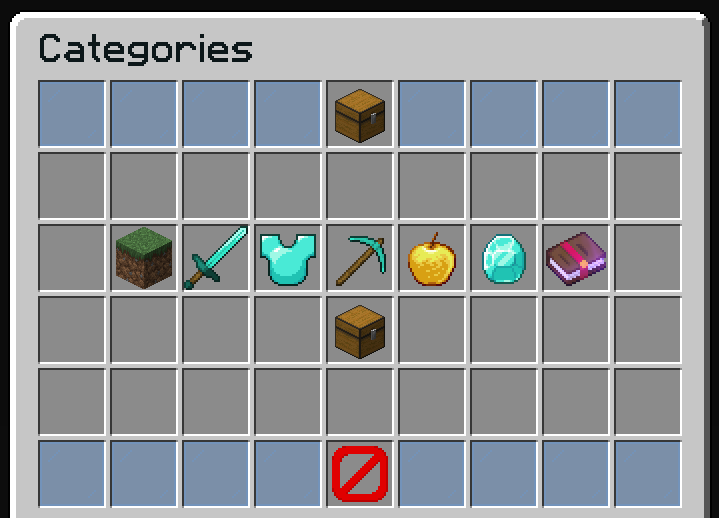
Preview
The categories inventory includes:
- Category buttons for each defined category
- "All Items" category (shows everything)
- Back button to return to auction
Default Configuration
name: "#0c1719Categories"
size: 54

patterns:
  - 'zauctionhouse-decoration'
  - 'zauctionhouse-back'

items:

  all-items:
    type: ZAUCTIONHOUSE_CATEGORY
    category: all
    slot: 4
    item:
      material: CHEST
      name: "#2CCED2<bold>ᴀʟʟ ɪᴛᴇᴍs"
      lore:
        - "#92ffffView all auction listings"
        - ""
        - "#92ffffTotal items#8c8c8c: #2CCED2%zauctionhouse_category_count_all%"
        - ""
        - "#8c8c8c• #2CCED2Click #92ffffto browse"

  blocks:
    type: ZAUCTIONHOUSE_CATEGORY
    category: blocks
    slot: 19
    item:
      material: GRASS_BLOCK
      name: "#7a7a7a<bold>ʙʟᴏᴄᴋs"
      lore:
        - "#92ffffAll building blocks"
        - ""
        - "#92ffffItems#8c8c8c: #2CCED2%zauctionhouse_category_count_blocks%"
        - ""
        - "#8c8c8c• #2CCED2Click #92ffffto browse"

  weapons:
    type: ZAUCTIONHOUSE_CATEGORY
    category: weapons
    slot: 20
    item:
      material: DIAMOND_SWORD
      name: "#ff5555<bold>ᴡᴇᴀᴘᴏɴs"
      lore:
        - "#92ffffCombat equipment"
        - "#92ffffSwords, bows, crossbows..."
        - ""
        - "#92ffffItems#8c8c8c: #2CCED2%zauctionhouse_category_count_weapons%"
        - ""
        - "#8c8c8c• #2CCED2Click #92ffffto browse"

  armor:
    type: ZAUCTIONHOUSE_CATEGORY
    category: armor
    slot: 21
    item:
      material: DIAMOND_CHESTPLATE
      name: "#55ffff<bold>ᴀʀᴍᴏʀ"
      lore:
        - "#92ffffProtective equipment"
        - ""
        - "#92ffffItems#8c8c8c: #2CCED2%zauctionhouse_category_count_armor%"
        - ""
        - "#8c8c8c• #2CCED2Click #92ffffto browse"

  tools:
    type: ZAUCTIONHOUSE_CATEGORY
    category: tools
    slot: 22
    item:
      material: DIAMOND_PICKAXE
      name: "#ffff55<bold>ᴛᴏᴏʟs"
      lore:
        - "#92ffffMining and farming tools"
        - ""
        - "#92ffffItems#8c8c8c: #2CCED2%zauctionhouse_category_count_tools%"
        - ""
        - "#8c8c8c• #2CCED2Click #92ffffto browse"

  consumables:
    type: ZAUCTIONHOUSE_CATEGORY
    category: consumables
    slot: 23
    item:
      material: GOLDEN_APPLE
      name: "#55ff55<bold>ᴄᴏɴsᴜᴍᴀʙʟᴇs"
      lore:
        - "#92ffffFood and potions"
        - ""
        - "#92ffffItems#8c8c8c: #2CCED2%zauctionhouse_category_count_consumables%"
        - ""
        - "#8c8c8c• #2CCED2Click #92ffffto browse"

  resources:
    type: ZAUCTIONHOUSE_CATEGORY
    category: resources
    slot: 24
    item:
      material: DIAMOND
      name: "#ffaa00<bold>ʀᴇsᴏᴜʀᴄᴇs"
      lore:
        - "#92ffffOres and materials"
        - ""
        - "#92ffffItems#8c8c8c: #2CCED2%zauctionhouse_category_count_resources%"
        - ""
        - "#8c8c8c• #2CCED2Click #92ffffto browse"

  enchanted-books:
    type: ZAUCTIONHOUSE_CATEGORY
    category: enchanted-books
    slot: 25
    item:
      material: ENCHANTED_BOOK
      name: "#ff55ff<bold>ᴇɴᴄʜᴀɴᴛᴇᴅ ʙᴏᴏᴋs"
      lore:
        - "#92ffffBooks with enchantments"
        - ""
        - "#92ffffItems#8c8c8c: #2CCED2%zauctionhouse_category_count_enchanted-books%"
        - ""
        - "#8c8c8c• #2CCED2Click #92ffffto browse"

  misc:
    type: ZAUCTIONHOUSE_CATEGORY
    category: misc
    slot: 31
    item:
      material: CHEST
      name: "#555555<bold>ᴍɪsᴄᴇʟʟᴀɴᴇᴏᴜs"
      lore:
        - "#92ffffOther items"
        - ""
        - "#92ffffItems#8c8c8c: #2CCED2%zauctionhouse_category_count_misc%"
        - ""
        - "#8c8c8c• #2CCED2Click #92ffffto browse"
Buttons Used
| Button | Type | Description |
|---|---|---|
all-items | ZAUCTIONHOUSE_CATEGORY | Shows all items |
blocks | ZAUCTIONHOUSE_CATEGORY | Filters by blocks |
weapons | ZAUCTIONHOUSE_CATEGORY | Filters by weapons |
armor | ZAUCTIONHOUSE_CATEGORY | Filters by armor |
tools | ZAUCTIONHOUSE_CATEGORY | Filters by tools |
consumables | ZAUCTIONHOUSE_CATEGORY | Filters by consumables |
resources | ZAUCTIONHOUSE_CATEGORY | Filters by resources |
enchanted-books | ZAUCTIONHOUSE_CATEGORY | Filters by enchanted books |
misc | ZAUCTIONHOUSE_CATEGORY | Filters by miscellaneous |
Placeholders
| Placeholder | Description |
|---|---|
%zauctionhouse_category_count_all% | Total items in auction |
%zauctionhouse_category_count_<name>% | Items in specific category |
Category Permissible
zAuctionHouse provides a custom zMenu permissible zauctionhouse_category that allows conditional button visibility based on the player's currently selected category. This is useful to show/hide buttons depending on the active category filter.
requirements:
  - type: zauctionhouse_category
    category: "weapons"
The button will only be visible when the player has selected the weapons category. If no category is selected, the default is main.
Adding Custom Categories
To add a new category:
-
Define the category in
categories.yml(see Categories Configuration) -
Add the button to this inventory:
my-custom-category:
  type: ZAUCTIONHOUSE_CATEGORY
  category: my-custom-category  # Must match categories.yml key
  slot: 32
  item:
    material: EMERALD
    name: "#00ff00<bold>ᴍʏ ᴄᴀᴛᴇɢᴏʀʏ"
    lore:
      - "#92ffffCustom category description"
      - ""
      - "#92ffffItems#8c8c8c: #2CCED2%zauctionhouse_category_count_my-custom-category%"
      - ""
      - "#8c8c8c• #2CCED2Click #92ffffto browse"
The category value must exactly match the key defined in categories.yml.