
Categories
Configure item categories in zAuctionHouse V4
Categories organize items in the auction house, making it easier for players to find what they're looking for. Configure them in categories.yml.
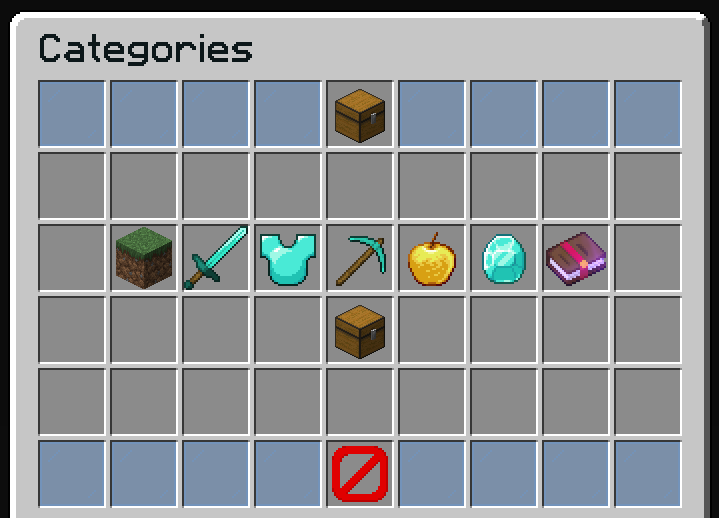
How Categories Work
- Each category has a unique ID (the YAML key, e.g., "weapons", "armor")
- Categories use rules to determine which items belong to them
- Items are automatically sorted into categories based on these rules
- An item can appear in multiple categories if it matches multiple rules
- A category without rules acts as a fallback for unmatched items
Category display order is defined in inventories/categories.yml, not in categories.yml. The categories file only defines the matching rules.
Multiple Files
You don't have to define all categories in categories.yml. You can create a categories/ folder and split your categories into multiple YAML files for better organization:
plugins/zAuctionHouse/
├── categories.yml          # Main file (optional)
└── categories/
    ├── weapons.yml
    ├── armor.yml
    └── custom-items.yml
Category Settings
settings:
  # Enable/disable the category system
  enabled: true

  # Display name for the "All" category
  all-category-name: "#0c1719Auction House"
Basic Category Structure
category-id:
  display-name: "#0c1719Category Name"
  rules:
    - type: material
      materials:
        - DIAMOND
        - EMERALD
Each category can also include optional banned-rules to exclude specific items. See Banned Rules (Exclusion) below.
Default Categories
Blocks Category
Matches all placeable blocks using Bukkit's BLOCKS tag:
blocks:
  display-name: "#0c1719Blocks"
  rules:
    - type: tag
      tags:
        - BLOCKS
Weapons Category
Matches combat weapons:
weapons:
  display-name: "#0c1719Weapons"
  rules:
    # All sword types by suffix
    - type: material-suffix
      suffixes:
        - "_SWORD"

    # Ranged weapons by material
    - type: material
      materials:
        - BOW
        - CROSSBOW
        - TRIDENT
Armor Category
Matches protective equipment:
armor:
  display-name: "#0c1719Armor"
  rules:
    # Standard armor pieces
    - type: material-suffix
      suffixes:
        - "_HELMET"
        - "_CHESTPLATE"
        - "_LEGGINGS"
        - "_BOOTS"

    # Special items
    - type: material
      materials:
        - ELYTRA
        - SHIELD
        - TURTLE_HELMET
Tools Category
Matches utility tools:
tools:
  display-name: "#0c1719Tools"
  rules:
    - type: material-suffix
      suffixes:
        - "_PICKAXE"
        - "_AXE"
        - "_SHOVEL"
        - "_HOE"

    - type: material
      materials:
        - SHEARS
        - FLINT_AND_STEEL
        - FISHING_ROD
Consumables Category
Matches food and potions:
consumables:
  display-name: "#0c1719Consumables"
  rules:
    - type: material
      materials:
        - POTION
        - SPLASH_POTION
        - LINGERING_POTION
        - GOLDEN_APPLE
        - ENCHANTED_GOLDEN_APPLE
        - COOKED_BEEF
        - COOKED_PORKCHOP
        - BREAD
        - CAKE
        - COOKIE
        - PUMPKIN_PIE
Resources Category
Matches ores, ingots, and crafting materials:
resources:
  display-name: "#0c1719Resources"
  rules:
    - type: material
      materials:
        - COAL
        - IRON_INGOT
        - GOLD_INGOT
        - DIAMOND
        - EMERALD
        - NETHERITE_INGOT
        - LAPIS_LAZULI
        - REDSTONE
        - COPPER_INGOT
        - AMETHYST_SHARD
        - RAW_IRON
        - RAW_GOLD
        - RAW_COPPER
Enchanted Books Category
enchanted-books:
  display-name: "#0c1719Enchanted Books"
  rules:
    - type: material
      materials:
        - ENCHANTED_BOOK
Miscellaneous Category (Fallback)
A category without rules catches all unmatched items:
misc:
  display-name: "#0c1719Miscellaneous"
  # No rules = fallback category for unmatched items
Rule Types
Categories use the same rule system as the blacklist/whitelist configuration. For a complete list of all available rule types (material, material-suffix, material-prefix, name, lore, custom-model-data, tag, AND/OR combinations, and custom item plugins), see the Rules documentation.
Banned Rules (Exclusion)
You can add a banned-rules list to any category to exclude specific items, even if they match the inclusion rules. This is useful when a broad rule (like a material suffix) includes items that should belong to a different category — for example, custom items identified by their CustomModelData.
Banned rules use the same rule types as regular rules (material, material-suffix, tag, name, lore, custom-model-data, and/or, etc.).
How it works
- The item is first checked against
banned-rules - If any banned rule matches, the item is excluded from the category
- Only then are the regular
rulesevaluated
Example: Exclude custom items from a category
A netherite hoe normally appears in the "Tools" category. But a netherite hoe with CustomModelData 300 (a custom item from a resource pack) should not. Use banned-rules to exclude it:
tools:
  display-name: "#0c1719Tools"
  rules:
    - type: material-suffix
      suffixes:
        - "_PICKAXE"
        - "_AXE"
        - "_SHOVEL"
        - "_HOE"
    - type: material
      materials:
        - SHEARS
        - FLINT_AND_STEEL
        - FISHING_ROD

  # Items matching these rules are EXCLUDED from the category
  banned-rules:
    - type: custom-model-data
      values:
        - 300
Example: Exclude specific materials
weapons:
  display-name: "#0c1719Weapons"
  rules:
    - type: material-suffix
      suffixes:
        - "_SWORD"
    - type: material
      materials:
        - BOW
        - CROSSBOW
        - TRIDENT

  # Exclude wooden swords from the weapons category
  banned-rules:
    - type: material
      materials:
        - WOODEN_SWORD
Example: Exclude by name
armor:
  display-name: "#0c1719Armor"
  rules:
    - type: material-suffix
      suffixes:
        - "_HELMET"
        - "_CHESTPLATE"
        - "_LEGGINGS"
        - "_BOOTS"

  # Exclude cosmetic items
  banned-rules:
    - type: name
      mode: CONTAINS
      values:
        - "Cosmetic"
Banned rules also work on the miscellaneous (fallback) category. You can use them to prevent certain items from appearing in the misc category.
Adding Custom Categories
- Add the category in
categories.yml:
my-custom-category:
  display-name: "#ff5555My Category"
  rules:
    - type: material
      materials:
        - DIAMOND_BLOCK
- EMERALD_BLOCK- Add a button in
inventories/categories.yml:
items:
  my-category-button:
    slot: 15
    type: ZAUCTIONHOUSE_CATEGORY
    category: my-custom-category
    item:
      material: DIAMOND_BLOCK
      name: "#ff5555My Category"
      lore:
        - "#92ffffClick to browse"
Category Examples
Rare Items (by lore)
rare-items:
  display-name: "#ff00ffRare Items"
  rules:
    - type: lore
      mode: CONTAINS
      values:
        - "Rare"
        - "Legendary"
        - "Mythical"
All Custom Items
custom-items:
  display-name: "#ffd700Custom Items"
  rules:
    - type: itemsadder
      items:
        - "*:*"  # All ItemsAdder items
    - type: oraxen
      items:
        - "*"    # All Oraxen items
Combined Conditions
special-swords:
  display-name: "#ff0000Special Swords"
  rules:
    - type: and
      rules:
        - type: material-suffix
          suffixes:
            - "_SWORD"
        - type: lore
          mode: CONTAINS
          values:
            - "Special Edition"
Full Example
settings:
  enabled: true
  all-category-name: "#0c1719Auction House"

blocks:
  display-name: "#0c1719Blocks"
  rules:
    - type: tag
      tags:
        - BLOCKS

weapons:
  display-name: "#0c1719Weapons"
  rules:
    - type: material-suffix
      suffixes:
        - "_SWORD"
    - type: material
      materials:
        - BOW
        - CROSSBOW
        - TRIDENT

armor:
  display-name: "#0c1719Armor"
  rules:
    - type: material-suffix
      suffixes:
        - "_HELMET"
        - "_CHESTPLATE"
        - "_LEGGINGS"
        - "_BOOTS"
    - type: material
      materials:
        - ELYTRA
        - SHIELD
        - TURTLE_HELMET

tools:
  display-name: "#0c1719Tools"
  rules:
    - type: material-suffix
      suffixes:
        - "_PICKAXE"
        - "_AXE"
        - "_SHOVEL"
        - "_HOE"
    - type: material
      materials:
        - SHEARS
        - FLINT_AND_STEEL
        - FISHING_ROD
  # Exclude custom items with specific CustomModelData
  banned-rules:
    - type: custom-model-data
      values:
        - 300

consumables:
  display-name: "#0c1719Consumables"
  rules:
    - type: material
      materials:
        - POTION
        - SPLASH_POTION
        - LINGERING_POTION
        - GOLDEN_APPLE
        - ENCHANTED_GOLDEN_APPLE

resources:
  display-name: "#0c1719Resources"
  rules:
    - type: material
      materials:
        - COAL
        - IRON_INGOT
        - GOLD_INGOT
        - DIAMOND
        - EMERALD
        - NETHERITE_INGOT

enchanted-books:
  display-name: "#0c1719Enchanted Books"
  rules:
    - type: material
      materials:
        - ENCHANTED_BOOK

misc:
  display-name: "#0c1719Miscellaneous"
  # Fallback category