
InventoriesAdmin
Admin History Main
Admin history main hub inventory configuration
The admin history main inventory is the hub for viewing a player's auction history. From here, admins can access all aspects of a player's auction activity.
File: plugins/zAuctionHouse/inventories/admin/admin-history-main.yml
Access: /ah admin history <player>
Permission: Requires admin permission
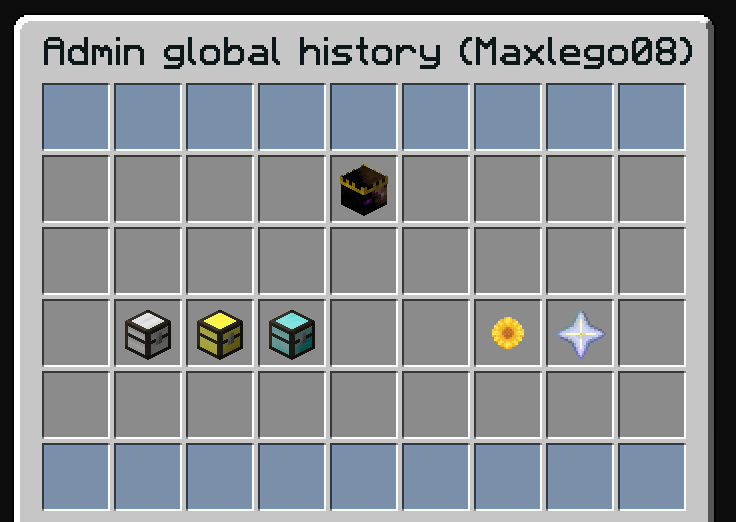
Features
- View target player's head and information
- Access expired items
- Access purchased items
- Access selling items
- Access action logs
- Access transaction history
Default Configuration
name: '#0c1719Admin global history (%target%)'
size: 54

items:

  target:
    type: ZAUCTIONHOUSE_ADMIN_HISTORY_MAIN
    slot: 13
    item:
      player-head: '%target%'
      name: '#2CCED2<bold>%target%'

  expired:
    type: ZAUCTIONHOUSE_ADMIN_HISTORY_EXPIRED
    slot: 28
    item:
      url: "eyJ0ZXh0dXJlcyI6eyJTS0lOIjp7InVybCI6Imh0dHA6Ly90ZXh0dXJlcy5taW5lY3JhZnQubmV0L3RleHR1cmUvZjdhYWRmZjlkZGM1NDZmZGNlYzZlZDU5MTljYzM5ZGZhOGQwYzA3ZmY0YmM2MTNhMTlmMmU2ZDdmMjU5MyJ9fX0="
      name: '#2CCED2<bold>ᴇxᴘɪʀᴇᴅ ɪᴛᴇᴍs'
      lore:
        - '#92ffff%target% has #2CCED2%expired-items% #92ffffexpired item%s%.'
        - ''
        - '#8c8c8c• #2CCED2Click #92ffffto open'

  purchased:
    type: ZAUCTIONHOUSE_ADMIN_HISTORY_PURCHASED
    slot: 29
    item:
      url: "eyJ0ZXh0dXJlcyI6eyJTS0lOIjp7InVybCI6Imh0dHA6Ly90ZXh0dXJlcy5taW5lY3JhZnQubmV0L3RleHR1cmUvZjM3Y2FlNWM1MWViMTU1OGVhODI4ZjU4ZTBkZmY4ZTZiN2IwYjFhMTgzZDczN2VlY2Y3MTQ2NjE3NjEifX19"
      name: '#2CCED2<bold>ᴘᴜʀᴄʜᴀsᴇᴅ ɪᴛᴇᴍs'
      lore:
        - '#92ffff%target% has #2CCED2%purchased-items% #92ffffbought item%s%.'
        - ''
        - '#8c8c8c• #2CCED2Click #92ffffto open'

  selling:
    type: ZAUCTIONHOUSE_ADMIN_HISTORY_SELLING
    slot: 30
    item:
      url: "eyJ0ZXh0dXJlcyI6eyJTS0lOIjp7InVybCI6Imh0dHA6Ly90ZXh0dXJlcy5taW5lY3JhZnQubmV0L3RleHR1cmUvMjU4MDdjYzRjM2I2OTU4YWVhNjE1NmU4NDUxOGQ5MWE0OWM1ZjMyOTcxZTZlYjI2OWEyM2EyNWEyNzE0NSJ9fX0="
      name: '#2CCED2<bold>sᴀʟᴇ ɪᴛᴇᴍs'
      lore:
        - '#92ffff%target% has #2CCED2%selling-items% #92ffffitem%s% on sale.'
        - ''
        - '#8c8c8c• #2CCED2Click #92ffffto open'

  logs:
    type: ZAUCTIONHOUSE_ADMIN_HISTORY_LOGS
    slot: 33
    item:
      material: SUNFLOWER
      name: '#2CCED2<bold>ʟᴏɢs'
      lore:
        - ''
        - '#8c8c8c• #2CCED2Click #92ffffto open'

  transactions:
    type: ZAUCTIONHOUSE_ADMIN_HISTORY_TRANSACTIONS
    slot: 34
    item:
      material: NETHER_STAR
      name: '#2CCED2<bold>ᴛʀᴀɴsᴀᴄᴛɪᴏɴs'
      lore:
        - ''
        - '#8c8c8c• #2CCED2Click #92ffffto open'
Buttons Used
| Button | Type | Description |
|---|---|---|
target | ZAUCTIONHOUSE_ADMIN_HISTORY_MAIN | Displays target player info |
expired | ZAUCTIONHOUSE_ADMIN_HISTORY_EXPIRED | Opens expired items |
purchased | ZAUCTIONHOUSE_ADMIN_HISTORY_PURCHASED | Opens purchased items |
selling | ZAUCTIONHOUSE_ADMIN_HISTORY_SELLING | Opens selling items |
logs | ZAUCTIONHOUSE_ADMIN_HISTORY_LOGS | Opens action logs |
transactions | ZAUCTIONHOUSE_ADMIN_HISTORY_TRANSACTIONS | Opens transactions |
Placeholders
| Placeholder | Description |
|---|---|
%target% | Target player's name |
%expired-items% | Target's expired item count |
%purchased-items% | Target's purchased item count |
%selling-items% | Target's selling item count |
%s% | Pluralization suffix |