
InventoriesAdmin
Admin Logs
Admin action logs inventory configuration
The admin logs inventory displays all action logs for a player. Logs record every auction action: listing, purchasing, and removing items.
File: plugins/zAuctionHouse/inventories/admin/admin-logs.yml
Access: From admin history main menu → Logs button
Permission: Requires admin permission
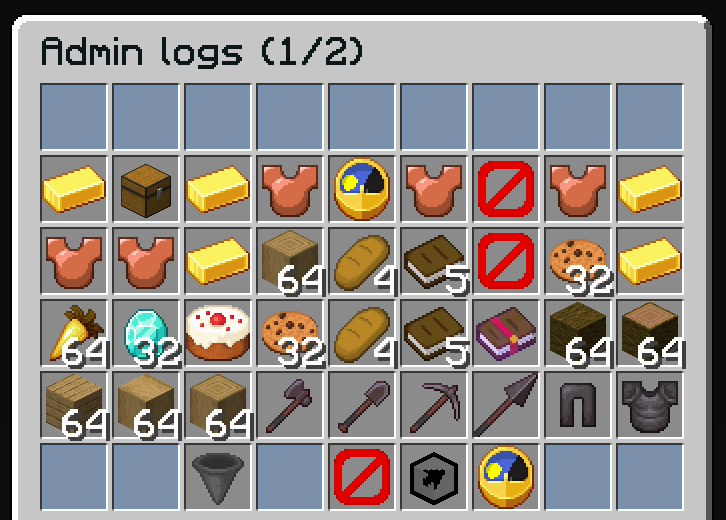
Log Types
| Type | Description |
|---|---|
SALE | Item was listed for sale |
PURCHASE | Item was purchased |
REMOVE_LISTED | Item was removed from active listing |
REMOVE_SELLING | Item was retrieved from selling inventory |
REMOVE_EXPIRED | Item was retrieved from expired inventory |
REMOVE_PURCHASED | Item was retrieved from purchased inventory |
Features
- Filter by log type
- Filter by date range
- View all auction actions for a player
Default Configuration
name: '#0c1719Admin logs (%page%/%max-page%)'
size: 54

patterns:
  - 'zauctionhouse-decoration'
  - 'zauctionhouse-pagination'
  - 'zauctionhouse-back'

items:

  items:
    type: ZAUCTIONHOUSE_ADMIN_LOGS
    loading-slot: 22
    slots:
      - 9-17
      - 18-26
      - 27-35
      - 36-44
    item:
      material: BARRIER
      name: "#ff0000Loading..."
    else:
      slots:
        - 22
      item:
        material: BARRIER
        name: '#ff0000&nNo Sales Found'
        lore:
          - ''
          - '&7You have not sold any items yet.'

  filter-type:
    type: ZAUCTIONHOUSE_ADMIN_LOGS_FILTER_TYPE
    slot: 47
    enable-text: ' #F27438➜ %type%'
    disable-text: ' #76CDCD➜ %type%'
    all-types-name: "All"
    types:
      - SALE
      - PURCHASE
      - REMOVE_LISTED
      - REMOVE_SELLING
      - REMOVE_EXPIRED
      - REMOVE_PURCHASED
    type-names:
      SALE: "Sale"
      PURCHASE: "Purchase"
      REMOVE_LISTED: "Remove Listed"
      REMOVE_SELLING: "Remove Owned"
      REMOVE_EXPIRED: "Remove Expired"
      REMOVE_PURCHASED: "Remove Purchased"
    item:
      material: HOPPER
      name: '#2CCED2<bold>ғɪʟᴛᴇʀ ʙʏ ᴛʏᴘᴇ'
      lore:
        - '#92ffffAvailable types:'
        - '%ALL%'
        - '%SALE%'
        - '%PURCHASE%'
        - '%REMOVE_LISTED%'
        - '%REMOVE_SELLING%'
        - '%REMOVE_EXPIRED%'
        - '%REMOVE_PURCHASED%'
        - ''
        - '#8c8c8c• #2CCED2Click #92ffffto change the filter type'

  filter-date:
    type: ZAUCTIONHOUSE_ADMIN_LOGS_FILTER_DATE
    slot: 51
    enable-text: ' #F27438➜ %date%'
    disable-text: ' #76CDCD➜ %date%'
    filters:
      - ALL
      - TODAY
      - THIS_WEEK
      - THIS_MONTH
      - THIS_YEAR
    filter-names:
      ALL: "All Time"
      TODAY: "Today"
      THIS_WEEK: "This Week"
      THIS_MONTH: "This Month"
      THIS_YEAR: "This Year"
    item:
      material: CLOCK
      name: '#2CCED2<bold>ғɪʟᴛᴇʀ ʙʏ ᴅᴀᴛᴇ'
      lore:
        - '#92ffffAvailable filters:'
        - '%ALL%'
        - '%TODAY%'
        - '%THIS_WEEK%'
        - '%THIS_MONTH%'
        - '%THIS_YEAR%'
        - ''
        - '#8c8c8c• #2CCED2Click #92ffffto change the date filter'
Buttons Used
| Button | Type | Description |
|---|---|---|
items | ZAUCTIONHOUSE_ADMIN_LOGS | Displays log entries |
filter-type | ZAUCTIONHOUSE_ADMIN_LOGS_FILTER_TYPE | Filters by log type |
filter-date | ZAUCTIONHOUSE_ADMIN_LOGS_FILTER_DATE | Filters by date range |
Date Filters
| Filter | Description |
|---|---|
ALL | All time |
TODAY | Today only |
THIS_WEEK | Last 7 days |
THIS_MONTH | Last 30 days |
THIS_YEAR | Last 365 days |